lmcache bench#
The lmcache bench command runs sustained performance benchmarks. It has
three sub-commands, each targeting a different layer of the stack:
Sub-command |
Description |
|---|---|
|
Benchmark an inference engine (e.g. vLLM) with workloads that exercise different KV-cache reuse patterns. |
|
End-to-end sanity test against a running LMCache MP cache server
(ZMQ + HTTP). Requires the full |
|
Throughput / latency benchmark against an L2 cache adapter (store / lookup / load). |
lmcache bench {engine,server,l2} [options]
engine#
The lmcache bench engine command runs sustained performance benchmarks
against an inference engine (e.g., vLLM). It supports multiple workload types
that exercise different caching patterns and reports TTFT, decoding speed, and
throughput metrics. One workload, rag-qa-quality, measures answer correctness instead of speed.
lmcache bench engine [options]
There are three ways to configure the benchmark:
CLI arguments – pass all options on the command line.
Interactive mode – run
lmcache bench enginewithout required args and follow the step-by-step prompts.Config file – save a configuration to JSON and replay it with
--config.
Quick Start#
Minimal (with all required arguments):
lmcache bench engine \
    --engine-url http://localhost:8000 \
    --workload long-doc-qa \
    --lmcache-url http://localhost:8080
Interactive mode (guided setup):
lmcache bench engine
The interactive mode walks you through each required setting, then asks whether you want to configure general and workload-specific options or use defaults.
From a saved config file:
lmcache bench engine --engine-url http://localhost:8000 \
    --config my_bench.json
Config files contain benchmark parameters (workload, KV cache settings, etc.) but not the engine URL, so you can reuse the same config against different engines.
Export a config without running the benchmark:
lmcache bench engine \
    --engine-url http://localhost:8000 \
    --workload long-doc-qa \
    --lmcache-url http://localhost:8080 \
    --export-config my_bench.json
This resolves all auto-detected values (model name, tokens per GB) and saves them to a portable JSON file that works without an LMCache server.
Non-interactive mode (for scripts and CI):
lmcache bench engine \
    --engine-url http://localhost:8000 \
    --workload long-doc-qa \
    --lmcache-url http://localhost:8080 \
    --no-interactive
Errors immediately if any required argument is missing, instead of entering interactive mode. Useful in automated pipelines.
If you don’t have an LMCache server, you can pass --tokens-per-gb-kvcache
directly instead of --lmcache-url
(see Finding --tokens-per-gb-kvcache for how to find this value).
General Options#
Flag |
Required |
Description |
|---|---|---|
|
No |
Load configuration from a JSON file. Skips interactive mode. CLI flags override values in the file. The engine URL is not stored in config files and must be provided separately. |
|
No |
Export resolved configuration to a JSON file and exit. Does not run the benchmark. Auto-detected values (model, tokens per GB) are resolved and saved so the config is portable. Environment- specific values (engine URL, LMCache URL) are excluded. |
|
No |
Disable interactive mode. Errors if required arguments are missing instead of prompting. Useful for scripts and CI. |
|
Yes |
Inference engine URL (e.g., |
|
Yes |
Workload type: |
|
* |
Tokens per GB of KV cache. Required unless |
|
No |
LMCache HTTP server URL. When provided, |
|
No |
Model name. Auto-detected from the engine if omitted. |
|
No |
Target active KV cache volume in GB (default: 100). |
|
No |
Random seed (default: 42). |
|
No |
Directory for CSV and JSON output files (default: current directory). |
|
No |
Skip CSV export. |
|
No |
Export a JSON summary file. |
|
No |
Suppress the real-time progress display. |
|
No |
Skip the warmup phase and start measuring immediately. See Warmup Phase. |
Finding --tokens-per-gb-kvcache#
If you have an LMCache server running, the easiest approach is to pass
--lmcache-url and let the tool auto-detect the value.
If you are using vLLM without LMCache, look for these lines in vLLM’s startup log:
INFO: Available KV cache memory: 12.34 GiB
INFO: GPU KV cache size: 567,890 tokens
Then compute:
tokens_per_gb = 567890 / 12.34 = 46,020
Warmup Phase#
Most workloads run a warmup phase before the measured run. What it sends is
workload-specific – long-doc-qa prefills each document, rag-qa-quality
prefills each document behind the system block, prefix-suffix-tuner sends a
full pass over its prefix pool, multi-round-chat primes each session, and
long-doc-permutator sends a single dummy request, and kv-tier-pressure
sweeps its whole document pool once. random-prefill has no warmup at all.
Warmup requests are sent with max_tokens=1 and their stats are discarded,
so they never appear in the reported numbers.
Warmup serves two purposes: it absorbs the engine’s one-time first-request cost
(torch.compile, CUDA-graph capture, weight paging), and – for the workloads
that prefill their data – it puts the KV cache in the state the measured run is
designed to exercise.
--no-warmup skips the phase entirely and starts measuring immediately:
lmcache bench engine \
    --engine-url http://localhost:8000 \
    --workload long-doc-qa \
    --lmcache-url http://localhost:8080 \
    --no-warmup
Use it to measure a cold start – what the first requests against a fresh engine and an empty cache actually cost – or to shorten a smoke test where the absolute numbers do not matter.
Warning
Do not compare a --no-warmup run against a warmed run: the numbers
measure different things. Without warmup, the first requests pay the
engine’s first-request cost and read from a cold cache, which inflates TTFT
and depresses cache hit rate.
For workloads whose warmup populates the data they then measure reuse of
(long-doc-qa, rag-qa-quality, prefix-suffix-tuner,
multi-round-chat), skipping it removes the reuse the workload was built
to measure. prefix-suffix-tuner in particular reports pass-2 results
against a cache that pass 1 was supposed to fill, so its output is not
meaningful with --no-warmup.
Workloads#
long-doc-qa#
Simulates repeated Q&A over long documents. Warmup sends each document once to populate the KV cache, then benchmark queries are dispatched with semaphore-controlled concurrency.
Flag |
Default |
Description |
|---|---|---|
|
10000 |
Token length of each synthetic document. |
|
2 |
Number of questions asked per document. |
|
random |
Request ordering: |
|
3 |
Maximum concurrent in-flight requests. |
Example:
lmcache bench engine \
    --engine-url http://localhost:8000 \
    --workload long-doc-qa \
    --lmcache-url http://localhost:8080 \
    --kv-cache-volume 50 \
    --ldqa-document-length 8000 \
    --ldqa-query-per-document 4 \
    --ldqa-shuffle-policy tile
multi-round-chat#
Simulates multi-round chat with stateful sessions. Creates concurrent user sessions, dispatches requests at a fixed QPS rate, and records responses in session history so each subsequent query includes prior context.
Flag |
Default |
Description |
|---|---|---|
|
2000 |
System prompt token length per session. |
|
10000 |
Pre-filled chat history token length. |
|
50 |
Tokens per user query. |
|
200 |
Max tokens to generate per response. |
|
1.0 |
Target queries per second. |
|
60.0 |
Benchmark duration in seconds. |
Example:
lmcache bench engine \
    --engine-url http://localhost:8000 \
    --workload multi-round-chat \
    --lmcache-url http://localhost:8080 \
    --mrc-qps 2.0 \
    --mrc-duration 120
long-doc-permutator#
Stress-tests blended KV cache reuse by sending permutations of a set of context documents. Each request concatenates all context documents in a different order:
[System Prompt] + [Doc_i1] + [Doc_i2] + ... + [Doc_iN]
A single dummy warmup request is sent before the benchmark phase. Requests are dispatched with semaphore-controlled concurrency.
Flag |
Default |
Description |
|---|---|---|
|
5 |
Number of unique context documents. |
|
5000 |
Token length of each context document. |
|
1000 |
Token length of the shared system prompt. Use |
|
10 |
Number of distinct permutations to send. Capped at N! where
N = |
|
1 |
Maximum concurrent in-flight requests. |
|
128 |
Maximum tokens to generate per permutation request. Use |
Example:
lmcache bench engine \
    --engine-url http://localhost:8000 \
    --workload long-doc-permutator \
    --lmcache-url http://localhost:8080 \
    --ldp-num-contexts 4 \
    --ldp-context-length 8000 \
    --ldp-num-permutations 24 \
    --ldp-num-inflight-requests 2
kv-tier-pressure#
Exercises the L2 storage tier. Where long-doc-permutator puts every
document in every request – so the distinct working set equals one prompt and
can never overflow L1 – this workload keeps a document pool larger than the
cache and samples a subset into each request:
[System Prompt] + [Doc_a] + [Doc_b] + ... + [Doc_k] (k of D, k << D)
Important
This workload assumes CacheBlend (enable_blending). Each request
concatenates a random subset of the pool in random order, so without
blending a document is reused only when everything before it in the prompt
also matches — which these prompts almost never satisfy. Such a run writes
a great deal to storage and reads very little back, while the share of
reads served by storage still looks healthy.
Watch cache-hit tokens per request, reported whenever --lmcache-url
is given, rather than the storage read share — the share is a ratio between
tiers and cannot tell the two cases apart.
Without blending, use --ktp-docs-per-request 1. Each prompt is then
[system prompt][document], which is prefix-stable and reuses normally.
When --lmcache-url is given the workload verifies this for you. After
the warm-up sweep it checks which lookup counter family moved: the blend
counters move only when the server runs the blend module and vLLM drives
it through CBKVConnector. If a multi-document run was not blended it
stops there, rather than producing a result that looks reasonable and
means nothing.
--ktp-pool-size is what decides whether the storage tier is reached: the
working set is pool_size x --ktp-context-length tokens, and only what
exceeds cache capacity can be evicted and read back. Omit it and the pool is
sized automatically from the capacity the LMCache server reports via
--lmcache-url, multiplied by --ktp-overflow-factor. To size it by hand
against a cache of V GB with a factor of F:
pool_size = ceil(F * V * tokens_per_gb_kvcache / context_length)
tokens_per_gb_kvcache comes from the engine’s KV layout and is resolved
automatically from --lmcache-url (see Finding --tokens-per-gb-kvcache). An
F of 2 means half the working set cannot be resident, so roughly half of
all cache reads must come from L2.
Treat that only as a dial. The idealised share 1 - 1 / F assumes pure LRU
over uniformly-drawn whole documents and ignores prefetch re-admission and
chunk-level sharing: 45% was measured at F = 1 on one stack and 36% at
F = 2 on another. Size the pool with it, then read the share that actually
occurred from the cache’s tier counters.
Warmup is a deterministic sweep: the pool is partitioned into
ceil(pool_size / docs_per_request) non-overlapping groups and each is sent
once, so every document is cached exactly once before measurement. This matters
because until L1 fills there is no eviction and therefore no L2 read – a share
measured across a cold start describes run length, not the system.
Flag |
Default |
Description |
|---|---|---|
|
derived |
Total documents in the corpus. Sets the working set, and therefore
whether the storage tier is reached. Derived from the server’s cache
capacity and |
|
2.0 |
Working set as a multiple of the server’s cache capacity. Used only
when |
|
16 |
Documents sampled into each request. Bounded by the engine’s context limit, not by the pool size. |
|
2560 |
Token length of each document (10 whole 256-token chunks). |
|
256 |
Token length of the shared system prompt. Use |
|
200 |
Number of measured requests. The warmup sweep is separate and sized automatically from the pool. |
|
0.0 |
Zipf exponent for document popularity. |
|
8 |
Maximum concurrent in-flight requests. |
|
1 |
Maximum tokens to generate per request. The default isolates prefill, the phase the cache tier affects; larger values add decode time that dilutes the measurement. |
The run reports a Document pool section alongside the standard metrics, giving the resolved pool size, working set, access skew and sweep size. These are inputs: the share of reads actually served by L2 comes from the cache’s own tier counters, not from this workload.
Example – target ~50% of cache reads from L2 against a 100 GB L1:
lmcache bench engine \
    --engine-url http://localhost:8000 \
    --workload kv-tier-pressure \
    --lmcache-url http://localhost:8080 \
    --ktp-pool-size 910 \
    --ktp-docs-per-request 16 \
    --ktp-context-length 2560 \
    --ktp-num-requests 200
Raise --ktp-pool-size for a larger share of reads from storage, and keep
it pinned when reproducing an earlier run so the corpus is identical.
prefix-suffix-tuner#
A two-pass sequential workload designed to be run unchanged across three LMCache configurations to demonstrate the value of each cache tier (L0 HBM, L1 DRAM, L2 disk):
Baseline |
LMCache config |
Targeted overflow |
Expected pass-2 hits |
|---|---|---|---|
1 |
vanilla vLLM (L0 only) |
L0 (HBM) |
none – every request a cold prefill |
2 |
vLLM + LMCache L1 + L2 |
L1 (DRAM) |
L2 prefix hits (suffix recomputed) |
3 |
vLLM + LMCache L1 + L2 + CacheBlend |
L1 (DRAM) |
L2 prefix hits + CacheBlend suffix hits |
Set --kv-cache-volume to the size in GB of the tier you want to overflow
(L0 size for Baseline 1, L1 size for Baselines 2 and 3). The workload itself
is identical across baselines.
Each request has the layout:
[prefix_i with unique-ID][random breaker][shared suffix]
num_prefixesdistinct prefixes, each starting withPREFIX_<8-hex>so the prefix’s tokenized hash differs across the pool.A fresh random 32-token breaker per request, defeating ordinary prefix caching past the prefix boundary.
A single shared suffix used by every request – the only entry CacheBlend can reuse.
Pass 1 (warmup) sends each prefix once to populate the cache; its stats are discarded. Pass 2 sends them again in identical order. Because LRU evicts the next-needed prefix on each pass-2 access, even a 1.05x overflow of the targeted tier is enough to make every pass-2 request miss that tier and fall through to the next one.
Flag |
Default |
Description |
|---|---|---|
|
8000 |
Total tokens per request (prefix + breaker + suffix). |
|
0.8 |
Fraction of context-length used by the prefix. Must be in (0.0, 1.0). The remainder (minus a 32-token breaker) is the shared suffix. |
|
20.0 |
Size in GB of the KV-cache tier to overflow. Use the L0 (HBM) size for vanilla vLLM, or the L1 (LMCache DRAM) size for tiered baselines. The workload sizes its prefix pool to slightly more than this (5% overflow internally), enough to drive every pass-2 request to a miss of that tier under sequential dispatch + LRU. |
The number of pass-2 (measured) requests equals the prefix pool size,
computed as
floor(psf_thrash * 1.05 * tokens_per_gb / prefix_tokens).
--kv-cache-volume is unused by this workload — sizing is driven solely
by --psf-thrash.
Example:
lmcache bench engine \
    --engine-url http://localhost:8000 \
    --workload prefix-suffix-tuner \
    --lmcache-url http://localhost:8080 \
    --psf-context-length 8000 \
    --psf-prefix-ratio 0.8 \
    --psf-thrash 100
Note
For the analytical-model claim “thrash ≈ L1 size → ~0% LMCache hit rate”
to hold empirically, the LMCache server must be started with
--eviction-ratio 0.99 (default 0.20 only clears 20% per cycle,
leaving ~60% of pass-1 content in cache through pass 2):
lmcache server --l1-size-gb <SIZE> --eviction-policy LRU \
    --eviction-trigger-watermark 0.80 \
    --eviction-ratio 0.99
The workload itself sleeps 5 seconds between pass 1 (warmup) and pass 2 (measured), so LMCache’s 1Hz batched-eviction polling thread has time to actually run. Without that sleep, fast benchmarks complete before any eviction fires.
rag-qa-quality#
Measures answer quality rather than speed: every other workload reports an unchanged number if the cache returns subtly wrong KV. Answers are scored against gold answers from a real QA dataset.
Each document is prefilled on its own during warmup; the measured request then composes them:
[system prompt][doc_a][doc_b]...[doc_n][question]
so every document is reused at a position it was never cached at – the RAG serving pattern, with no artificial perturbation.
Flag |
Default |
Description |
|---|---|---|
|
required |
A known dataset name ( |
|
50 |
Questions to measure, taken in dataset order. |
|
1024 |
Token budget per answer. Must fit a reasoning model’s thinking block as well as the answer tags. |
|
(unset) |
Chat-template variables as |
|
|
Per-sample results file. |
--kv-cache-volume is unused, but --tokens-per-gb-kvcache (or
--lmcache-url) is still required. A tokenizer is required too, for chunk
alignment: pass --model, or let it auto-detect from /v1/models.
Datasets are not vendored. Named ones download from the HuggingFace Hub on
first use and cache under HF_HOME; any other value is a local path.
Name |
Source |
Notes |
|---|---|---|
|
|
JSONL, 20 passages per question, ~2.1k tokens. |
|
|
Parquet (distractor/validation); requires |
Local files load unchanged if their records carry passages, a question, and
gold answers – ctxs[].{title,text}, paragraphs[].paragraph_text,
context, or the RAGAS hand-off fields retrieved_contexts,
user_input and reference. Records missing any of the three are
skipped.
Comparing two stacks. The workload reports one arm; run it twice and diff
the files by sample_id:
ARGS="--workload rag-qa-quality --tokens-per-gb-kvcache 6000 \
      --rag-dataset musique --rag-num-samples 20"

lmcache bench engine --engine-url http://localhost:8000 $ARGS --rag-output a.json
lmcache bench engine --engine-url http://localhost:8001 $ARGS --rag-output b.json
The files are comparable only when their ``run_fingerprint`` values match. It covers the selected samples’ ids, rendered prompts and gold answers, along with the dataset path, budget, template kwargs, model, seed and chunk alignment. Editing a selected question, document or reference at the same dataset path changes the fingerprint; output paths and unmeasured records do not. Fingerprints from older versions that covered only sample ids are not comparable with these content-based fingerprints.
Note
Start each run from a clean cache – restart the server, or
lmcache kvcache clear --url <mp-url> – or the second run hits the
first run’s cached composites instead of measuring per-document reuse.
Note
No cache-hit metrics are reported; quality is measured from the responses alone. To tell “quality unchanged” apart from “LMCache never engaged”, check the engine’s own counters around a run:
curl -s http://localhost:8080/metrics | grep lookup_.*_tokens_total
Reasoning models. --rag-template-kwargs has no default: disabling
thinking can lower multi-hop QA quality, and the right setting is
model-specific (enable_thinking=true, reasoning_effort=high). Too
small a budget cuts generation off before the closing tag, so the sample
does not parse and drops out of the score – watch Parse rate.
random-prefill#
Fires all requests simultaneously with max_tokens=1 to measure pure
prefill performance. No warmup phase.
Flag |
Default |
Description |
|---|---|---|
|
10000 |
Token length per prefill request. |
|
50 |
Number of requests to fire. |
Example:
lmcache bench engine \
    --engine-url http://localhost:8000 \
    --workload random-prefill \
    --lmcache-url http://localhost:8080 \
    --rp-request-length 15000 \
    --rp-num-requests 100
Interactive Mode#
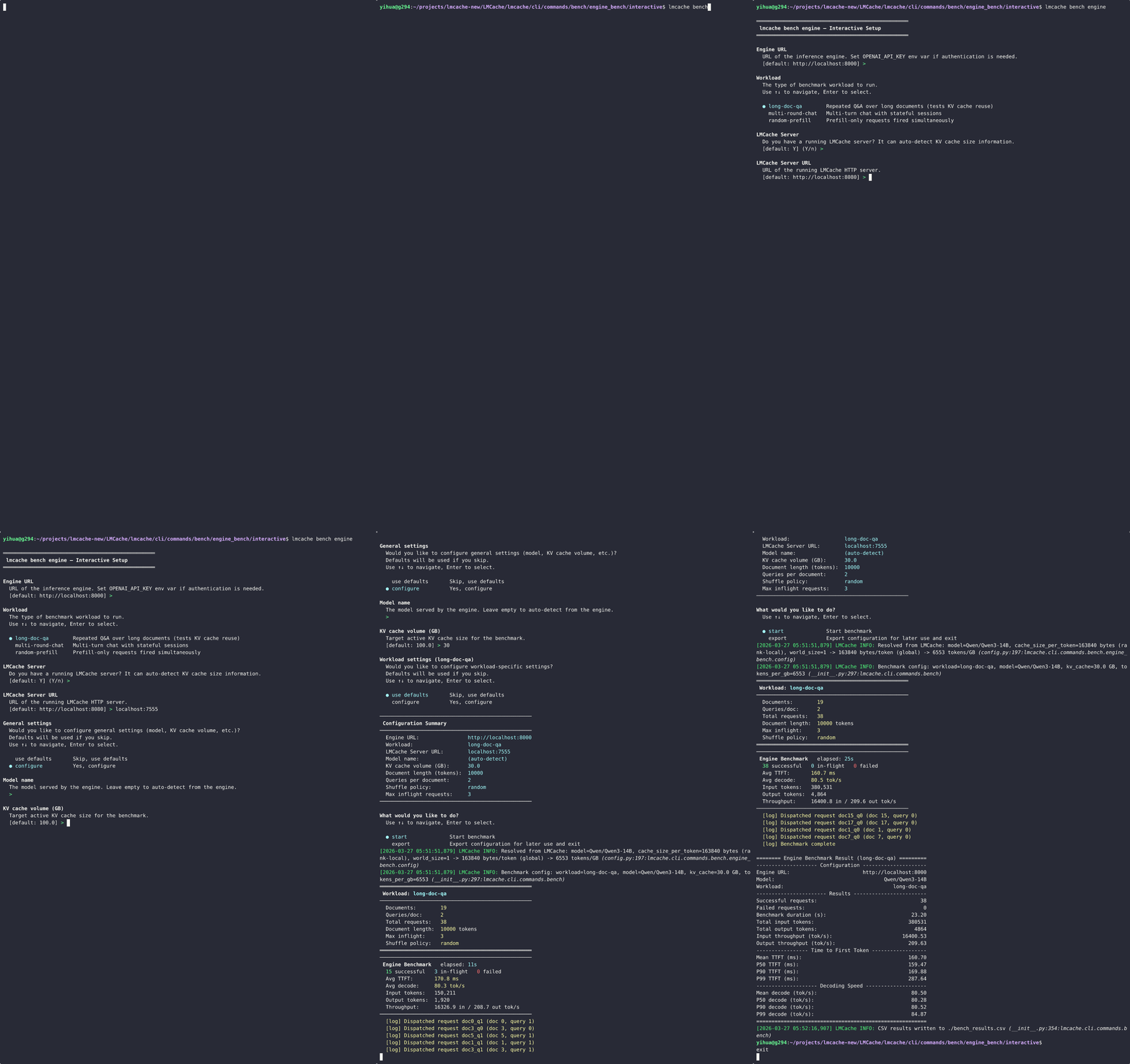
When --engine-url or --workload is not provided (and
--no-interactive is not set), the tool enters interactive mode. It guides
you through four phases:
Required settings – engine URL, workload type, LMCache server (or tokens per GB).
General settings (optional gate) – model name, KV cache volume.
Workload settings (optional gate) – workload-specific parameters.
Summary and action – review configuration, then start the benchmark or export to a JSON file.
Each prompt focuses on a single setting. Selection prompts use arrow keys; text and number prompts accept typed input with defaults shown in brackets.
══════════════════════════════════════════════════
 lmcache bench engine -- Interactive Setup
══════════════════════════════════════════════════

Engine URL
  URL of the inference engine.
  [default: http://localhost:8000] >

Workload
  The type of benchmark workload to run.
  Use up/down to navigate, Enter to select.

  * long-doc-qa           Repeated Q&A over long documents
    multi-round-chat       Multi-turn chat with stateful sessions
    long-doc-permutator    Permutations of context documents
    prefix-suffix-tuner    Two-pass tiered KV-cache demonstrator
    rag-qa-quality         Answer quality (F1) on real QA data
    random-prefill         Prefill-only requests fired simultaneously

LMCache Server
  Do you have a running LMCache server?
  It can auto-detect KV cache size information.
  [default: Y] (Y/n) >

...

──────────────────────────────────────────────────
 Configuration Summary
──────────────────────────────────────────────────
  Workload:             long-doc-qa
  Model:                Qwen/Qwen3-14B
  Tokens per GB:        6553
  ...
──────────────────────────────────────────────────

What would you like to do?
  * Start benchmark
    Export configuration for later use and exit
When you choose “Export configuration”, all auto-detected values (model name, tokens per GB) are resolved and saved to a portable JSON file.
Config File#
Config files store benchmark parameters but not environment-specific values like engine URL or LMCache URL. This lets you reuse the same config across different environments.
You can create a config file in three ways:
Interactive mode – choose “Export configuration” at the summary step.
``–export-config`` – resolve and export from CLI without running.
Manually – write JSON with keys matching CLI arg names (dashes replaced by underscores).
Example config file:
{
  "model": "Qwen/Qwen3-14B",
  "workload": "long-doc-qa",
  "tokens_per_gb_kvcache": 6553,
  "kv_cache_volume": 100.0,
  "ldqa_document_length": 10000,
  "ldqa_query_per_document": 2,
  "ldqa_shuffle_policy": "random",
  "ldqa_num_inflight_requests": 3
}
Load it with --config (engine URL must be provided separately):
lmcache bench engine --engine-url http://localhost:8000 \
    --config my_bench.json
CLI arguments override config file values, so you can use a base config and tweak individual settings:
# Use saved config but override KV cache volume
lmcache bench engine --engine-url http://localhost:8000 \
    --config my_bench.json --kv-cache-volume 200
Output#
Terminal (real-time progress)#
During the benchmark, a live progress display shows in-flight requests,
average TTFT, decode speed, and throughput. Suppress it with -q.
Terminal (final summary)#
After completion, a summary table is printed:
======= Engine Benchmark Result (long-doc-qa) ========
---------------------- Configuration ------------------
Engine URL:                       http://localhost:8000
Model:                            Qwen/Qwen3-14B
Workload:                         long-doc-qa
------------------------- Results ---------------------
Successful requests:              20
Failed requests:                  0
Benchmark duration (s):           31.34
Total input tokens:               200000
Total output tokens:              2560
Input throughput (tok/s):         6381.62
Output throughput (tok/s):        81.69
--------------- Time to First Token -------------------
Mean TTFT (ms):                   313.41
P50 TTFT (ms):                    272.83
P90 TTFT (ms):                    587.21
P99 TTFT (ms):                    837.32
------------------ Decoding Speed ---------------------
Mean decode (tok/s):              48.23
P99 decode (tok/s):               38.55
======================================================
A workload may append sections of its own after the shared ones.
rag-qa-quality adds Answer Quality:
-------------------- Answer Quality --------------------
Samples measured:                                     20
Samples scored:                                       20
Parse rate:                                         1.00
Mean F1 (scored only):                              0.31
Run fingerprint:                        61709aae928fdba8
Field |
Meaning |
|---|---|
|
Questions sent. |
|
Of those, how many produced a complete |
|
|
|
SQuAD-normalized token-overlap F1, best over the gold answers, averaged over scored samples only. Always read it together with the parse rate: a high F1 over a third of the samples is a different result from the same F1 over all of them. |
|
Digest of everything determining the prompts. Two runs are comparable only when these match. |
CSV and JSON#
bench_results.csv– per-request metrics (TTFT, latency, decode speed, token counts). Written by default; skip with--no-csv.bench_summary.json– aggregate statistics with percentiles and config metadata. Opt-in with--json.
Both files are written to --output-dir (default: current directory).
Per-sample quality results#
rag-qa-quality additionally writes its own file to --rag-output:
{
  "run_fingerprint": "61709aae928fdba8",
  "model": "meta-llama/Llama-3.1-8B-Instruct",
  "config": {"dataset": "musique", "num_samples": 20, "max_output_length": 256,
             "template_kwargs": {}, "output_path": "a.json"},
  "summary": {"num_samples": 20, "num_parsed": 20, "parse_rate": 1.0,
              "f1_mean": 0.3144},
  "per_sample": [
    {"sample_id": "2hop__481349_302087", "f1": 0.6667, "parsed": true,
     "answer": "Bombardier Aerospace", "ttft": 0.1624, "num_output_tokens": 26},
    {"sample_id": "2hop__697790_864352", "f1": null, "parsed": false,
     "answer": "", "ttft": 0.1701, "num_output_tokens": 256}
  ]
}
An unparsed sample’s f1 is null, not 0.0 – so a cross-run
diff can pair by sample_id and skip what either run failed to score,
rather than averaging a parsing failure in as a wrong answer.
Exit Codes#
Code |
Meaning |
|---|---|
|
All requests succeeded. |
|
One or more requests failed. |
server#
The lmcache bench server command is an end-to-end sanity test for the
LMCache Multi-Process (MP) cache server. It connects to a running server
over ZMQ and exercises the full KV-cache data path for a sequence of
synthetic requests, then optionally verifies per-chunk checksums through
the HTTP API.
lmcache bench server [options]
Unlike lmcache bench engine, this command does
not require an inference engine. It only needs a running LMCache MP
server (ZMQ + HTTP). GPU mode additionally requires a CUDA-capable device.
It also requires the full lmcache install (not the lightweight
lmcache-cli package).
What it does#
For each sequence in [--start, --end), the tool runs two passes:
Cold pass –
LOOKUPis expected to miss, so the generated KV tensors areSTOREd on the server.Warm pass –
LOOKUPis expected to hit; the tool issuesRETRIEVEand compares the retrieved KV chunks’ checksums to the originals.
The full RPC path exercised is:
REGISTER_KV_CACHE → GET_CHUNK_SIZE → LOOKUP
  → QUERY_PREFETCH_STATUS → RETRIEVE → STORE
  → END_SESSION
When --url points to the server’s HTTP endpoint, per-chunk checksums
are additionally cross-checked against the server-side computation, so a
mismatch between producer and consumer surfaces as a loud
CHECKSUM MISMATCH log line.
Quick start#
Start the MP server in one terminal:
lmcache server \
    --host localhost --port 15556 \
    --chunk-size 256 --l1-size-gb 5 \
    --eviction-policy LRU --max-workers 1
Then in another terminal:
lmcache bench server \
    --rpc-url tcp://localhost:15556 \
    --url http://localhost:8080
By default the tool runs forever (--end unset); stop it with
Ctrl-C at any time. Pass --end N for a bounded run.
Options#
Flag |
Default |
Description |
|---|---|---|
|
|
ZMQ endpoint of the MP cache server. |
|
|
HTTP base URL of the server’s checksum API. Used to verify per-chunk checksums end-to-end. |
|
|
Run mode. |
|
|
Transport routing for STORE/RETRIEVE. |
|
|
Tokens per synthetic request. |
|
|
Number of paged blocks allocated on the GPU. |
|
|
Tokens per paged block. |
|
|
First sequence number to run. |
|
(unset) |
Exclusive upper bound on sequence numbers. When omitted the loop runs forever. |
|
|
Delay between successive sub-passes. |
|
|
Number of clients sending requests at the same time (see below). |
|
|
KV cache shape spec (see below). |
|
|
Stdout output format for the final metrics summary. Available:
|
|
(unset) |
Save the final metrics summary to a file at PATH (format chosen
by |
|
(unset) |
Suppress all progress messages during the run. Only the final
structured metrics summary is emitted (unless also redirected
via |
CPU mode (no GPU)#
--mode cpu runs the same end-to-end path without a GPU. The server
runs on a CPU-only host (StubCPUDevice); the bench tool allocates regular
CPU KV tensors and exercises the full RPC path through TransferContext.
The engine-driven context uses server-owned SHM staging when available and
falls back to typed inline tensor transport. In lmcache_driven mode, the CPU wrapper
migrates the tensors to POSIX SHM during registration.
By default --mode cpu uses the engine-driven gather/scatter path
(auto → cpu→engine_driven); that path requires the server to
be started with --supported-transfer-mode engine_driven or
auto, since the server’s default lmcache_driven does not load
it. To use the zero-copy SHM handle path instead, pass
--transfer-mode lmcache_driven:
# Terminal 1 -- start the LMCache server (no GPU required)
lmcache server \
    --host localhost --port 5555 \
    --l1-size-gb 2 --eviction-policy LRU

# Terminal 2 -- run bench in CPU + lmcache_driven mode
lmcache bench server \
    --rpc-url tcp://localhost:5555 \
    --url http://localhost:8080 \
    --mode cpu --transfer-mode lmcache_driven \
    --start 0 --end 2
KV cache shape spec#
The --kvcache-shape-spec flag describes how KV tensors are laid out on
the GPU. A spec is one or more groups separated by ;:
(kv_size,NB,BS,NH,HS):dtype:layers[;(...):dtype:layers...]
Fields:
kv_size– 2 for classical attention (separate K/V), 1 for MLA.NB– number of paged blocks.BS– block size (tokens per block).NH– number of attention heads per layer.HS– head size (in elements).dtype– element dtype (e.g.float16,bfloat16,float32,uint8). The full set matches the keys ofDTYPE_MAPinlmcache/v1/kv_layer_groups.py.layers– number of layers in this group.
Multi-group specs let you model heterogeneous layers (for example, MLA layers + classical attention layers in the same model):
lmcache bench server \
    --rpc-url tcp://localhost:15556 \
    --kvcache-shape-spec "(1,1024,16,1,128):float16:4;(2,1024,16,8,128):float16:28"
All groups must share the same NB and BS (this is a physical
constraint of paged KV). Layer counts across groups sum to the total
layer count registered with the server.
MLA (Multi-head Latent Attention)#
Set kv_size=1 to exercise the MLA data path. MLA folds K and V into
a single latent plane, so each chunk on the wire is
(num_layers, chunk_tokens, num_heads * head_size) instead of the
classical (2, num_layers, chunk_tokens, num_heads * head_size).
The bench also allocates each per-layer client tensor as rank-3
(NB, BS, num_heads * head_size) (rather than the classical rank-5
(2, NB, BS, NH, HS)), which is what the server’s vLLM detector
recognises as MLA – see NL_X_NB_BS_HS in
lmcache/v1/gpu_connector/kv_format/detectors/vllm.py.
Pure MLA example (DeepSeek-V2-style, 61 layers, single latent head):
lmcache bench server \
    --rpc-url tcp://localhost:15556 \
    --kvcache-shape-spec "(1,1024,16,1,128):bfloat16:61"
Both transfer modes support MLA:
lmcache_driven(GPU default / CPU opt-in): the server discoversuse_mlafrom the registered tensor shapes – the bench’s rank-3 MLA client tensors trip this automatically.engine_driven(CPU default): the bench derivesuse_mlafrom the tensor layout throughTransferContext, so the server sizes its SHM chunks correctly.
Note
Heterogeneous specs that mix kv_size=1 and kv_size=2 groups
are supported in lmcache_driven mode – each layer’s rank (3 vs. 5)
tells the detector which per-group KV format to use. engine_driven
currently supports one KV group per context; use lmcache_driven for
heterogeneous or hybrid KV groups.
Tensor Parallel (TP > 1)#
--tp-size N (default: 1) simulates a TP world of N vLLM
workers against a single LMCache server. Each rank registers its own
KV cache under a distinct instance_id, so the server holds one
context per rank – exactly the layout LMCacheMPWorkerAdapter
creates in a real deployment. Fan-out for the store / retrieve /
lookup ops mirrors ParallelStrategy from the vLLM adapter:
LOOKUPfires exactly once per request (scheduler-scoped,worker_id=None).RETRIEVEfires on every rank – each worker loads its own KV shard back.STOREfires on KV writers only. Non-MLA: every rank is a writer. MLA: only rank 0 is a writer (the latent plane is shared across ranks; storing from every rank would just re-write identical bytes).
Example: MLA + TP=2, exercising rank 0 STORE + both-rank RETRIEVE:
lmcache bench server \
    --rpc-url tcp://localhost:15556 \
    --mode cpu --transfer-mode lmcache_driven \
    --kvcache-shape-spec "(1,1024,16,1,128):bfloat16:8" \
    --tp-size 2
The bench’s client-side checksum aggregates writer-rank bytes only,
so a cold-vs-warm mismatch pinpoints the exact rank whose round trip
went wrong – useful for verifying that a new server-side change
handles per-rank instance_id routing correctly.
See parse_kvcache_shape_spec in lmcache/v1/kv_layer_groups.py
for the authoritative parsing rules and validation errors.
Concurrent clients#
With the default --concurrency 1 a single client sends one request at a
time, so the run measures per-request latency but never queues work on the
server. --concurrency N runs N clients in parallel, each with its own
connection and KV tensors, and its Workers registered under their own
instance_id block. Sequences are dealt round-robin (client k runs
start + k, start + k + N, …), so no two clients touch the same
keys and the cold/warm checks stay valid.
lmcache bench server \
    --rpc-url tcp://localhost:5555 --mode cpu \
    --start 0 --end 400 --interval 0 --concurrency 8
The summary adds Concurrency, Elapsed (s), and Requests / s.
Use --interval 0 when comparing throughput, otherwise the delay
dominates. Requests / s counts cold/warm sequence pairs, matching
Total requests.
Size the server’s L1 to hold the whole run. If stores arrive faster than the eviction controller frees memory, the server drops them, and the affected warm lookups miss and fail their checks.
Profiling the server#
lmcache bench server is a ZMQ client: the store path it exercises
(hashing, allocation, gather, D2H) runs inside the server process, not
this benchmark. --flamegraph on therefore attaches the profiler to a
server pid you supply, records for the duration of the load, and renders a
flame graph of the server, not of the client.
lmcache bench server \
    --rpc-url tcp://localhost:5555 \
    --start 0 --end 200 --interval 0.02 \
    --flamegraph on --flamegraph-mode gil \
    --profile-server-pid "$(pgrep -f 'lmcache server')"
--flamegraph-mode takes the same six values documented under
lmcache tool flamegraph (or several
comma-separated to drive the load once per mode, one SVG each). Because the
target is a separate, already-running server (not a process this benchmark
spawns), it profiles by attaching, so the same attach-mode caveats
documented for
lmcache tool flamegraph apply here: what each mode
shows, the PYTHONPERFSUPPORT=1 requirement for naming Python frames in
the perf/bcc modes, the container privileges each mode needs, and the fact
that recording a live process is never free.
Note
The one thing unique to bench server: it records while it drives
load, so the recording overhead lands on the very throughput/latency
this benchmark reports. Keep the profiled run short and read those
numbers as indicative, not a clean baseline.
Output#
After the run completes (or is interrupted with Ctrl-C), a structured
metrics summary is printed. The summary includes:
Configuration – RPC URL, mode, transfer mode, tokens per request, interval, concurrency.
Results – total requests, checksum OK / FAIL counts, pass rate, elapsed time, requests per second.
Latency sections – per-operation latency statistics (count, mean, min, max, p50, p99) for cold lookup, cold store, warm lookup, and warm retrieve.
Use --format json to get machine-readable output, or --output FILE
to save the summary to a file.
================ Server Bench Result =================
---------------------- Configuration -----------------
RPC URL:                          tcp://localhost:15556
Mode:                             gpu
Transfer mode:                    auto
Tokens / request:                 512
Interval (s):                     0.5
------------------------- Results --------------------
Total requests:                   3
Checksum OK:                      3
Checksum FAIL:                    0
Pass rate (%):                    100.0
-------------------- Cold Lookup (ms) ---------------
count:                            3
mean:                             1.647
min:                              1.312
max:                              1.823
p50:                              1.647
p99:                              1.823
--------------------- Cold Store (ms) ---------------
count:                            3
mean:                             1.740
min:                              1.521
max:                              1.982
p50:                              1.740
p99:                              1.982
-------------------- Warm Lookup (ms) ---------------
count:                            3
mean:                             1.310
min:                              1.102
max:                              1.512
p50:                              1.310
p99:                              1.512
------------------- Warm Retrieve (ms) --------------
count:                            3
mean:                             1.480
min:                              1.321
max:                              1.612
p50:                              1.480
p99:                              1.612
=====================================================
Example output (progress)#
During the run, progress messages are printed to stdout (suppressed by
-q / --quiet):
Connecting to LMCache MP Server at tcp://localhost:15556 (mode=gpu) ...
Server chunk_size = 256
Resolved KV shape spec: (2,1024,16,8,128):float16:32
[seq=0] LOOKUP cold:  0/2 chunks hit (1.82 ms)
[seq=0] STORE:        2 chunks stored (1.74 ms)
[seq=0] LOOKUP warm:  2/2 chunks hit (1.31 ms)
[seq=0] RETRIEVE:     2 chunks retrieved (1.48 ms)
[seq=0] CHECKSUM MATCH OK
[seq=1] ...
Any CHECKSUM MISMATCH, ERROR, or Python traceback in the log
indicates a real problem worth investigating.
Exit codes#
Code |
Meaning |
|---|---|
|
Test loop completed (or was interrupted cleanly with Ctrl-C) with no checksum mismatches. |
|
Fatal error (for example, CUDA unavailable in |
l2#
The lmcache bench l2 command benchmarks an L2 cache adapter
(e.g. the local-filesystem adapter) end-to-end through the same
parse_args_to_l2_adapters_config + create_l2_adapter pipeline that
LMCache uses in production. Any registered adapter type can be tested
without code changes: you describe the adapter with a single JSON spec
and pick the operations to exercise.
lmcache bench l2 [options]
Unlike lmcache bench engine, this command
does not require an inference engine or an LMCache MP server. It
only needs the adapter’s own backing storage to be reachable (for the
fs adapter, that simply means a writable directory).
What it does#
For each measured operation the tool drives the adapter directly via its public submit/wait API:
Store–submit_store_taskwritesnum_keysMemoryObjs per submit and waits for the store eventfd.Lookup–submit_lookup_and_lock_taskchecks key existence (no payload transfer) and waits for the lookup eventfd.Load–submit_load_taskreadsnum_keysMemoryObjs per submit and waits for the load eventfd.
Each measured round issues --in-flight submits sequentially from
a single producer thread and then waits for all of them to complete; the
round duration is the wall-clock time from the first submit until the
last completion. Warmup rounds run before measurement and their results
are discarded from the final summary.
All three operations share the same key idx universe, so running
--only store followed by --only load (or --only lookup) with
identical other flags hits exactly the same keys. This makes the
benchmark useful as a quick regression test for adapters that should
support a clean store -> load round-trip.
Note
When --only is not given, the three operations are run in a
single process in the order store -> lookup -> load. For
adapters whose backing storage sits behind an OS-level cache –
most notably the local-filesystem (fs) adapter, which is
subject to the Linux page cache – this means lookup and
load will almost always observe the data that store just
wrote still hot in RAM, and the reported numbers reflect
page-cache throughput rather than the underlying device.
To benchmark each operation against a cold cache, run them
separately with --only and drop the OS caches in between, for
example:
lmcache bench l2 --l2-adapter '...' --only store
sync && echo 3 | sudo tee /proc/sys/vm/drop_caches
lmcache bench l2 --l2-adapter '...' --only lookup
sync && echo 3 | sudo tee /proc/sys/vm/drop_caches
lmcache bench l2 --l2-adapter '...' --only load
For adapters that bypass the page cache (e.g. fs with
"use_odirect": true) or that talk to a remote service without
a local cache, the default combined run is usually fine.
O_DIRECT adapters may also require the benchmark L1 buffer to
satisfy the adapter’s block alignment. Use --l1-align-bytes to
set that alignment, commonly 4096 for local block devices. The
payload size (--data-size-kb * 1024) must be a multiple of the
selected alignment.
To benchmark against a hugepage-backed L1 tier, pass
--l1-use-hugepages. The buffer is then allocated from the 2 MiB
hugepage pool. Pre-allocate enough pages with sysctl vm.nr_hugepages;
the buffer needs ceil(2 * in_flight * num_keys * data_size / 2 MiB)
pages.
Quick start#
Benchmark the local filesystem adapter with default parameters:
lmcache bench l2 \
    --l2-adapter '{"type":"fs","base_path":"/tmp/lmcache-bench"}'
This runs all three operations (store, lookup, load) with one warmup round and one measurement round.
Stress the adapter with more in-flight submits and larger payloads:
lmcache bench l2 \
    --l2-adapter '{"type":"fs","base_path":"/data/lmcache-bench","relative_tmp_dir":"tmp"}' \
    --num-keys 32 --in-flight 4 \
    --data-size-kb 512 \
    --rounds 5 --warmup-rounds 1
Benchmark an O_DIRECT adapter with aligned L1 buffers:
lmcache bench l2 \
    --l2-adapter '{"type":"raw_block","device_path":"/dev/nvme0n1","slot_bytes":4194304,"use_odirect":true,"block_align":4096}' \
    --data-size-kb 1024 \
    --l1-align-bytes 4096
Run only one operation (useful to isolate store vs. load throughput):
lmcache bench l2 \
    --l2-adapter '{"type":"fs","base_path":"/tmp/lmcache-bench"}' \
    --only store
Lookup with a controlled hit rate (the benchmark splits the lookup keys between a potentially-existing range and a guaranteed-non-existent range):
lmcache bench l2 \
    --l2-adapter '{"type":"fs","base_path":"/tmp/lmcache-bench"}' \
    --only lookup --lookup-max-hit-rate 0.5
Enable a store -> load round-trip data integrity check on the last measured round:
lmcache bench l2 \
    --l2-adapter '{"type":"fs","base_path":"/tmp/lmcache-bench"}' \
    --no-skip-verify
If you prefer to keep the JSON spec out of the command line, set the
L2_ADAPTER_JSON environment variable instead of passing
--l2-adapter:
export L2_ADAPTER_JSON='{"type":"fs","base_path":"/tmp/lmcache-bench"}'
lmcache bench l2 --num-keys 32 --in-flight 2
Options#
Flag |
Default |
Description |
|---|---|---|
|
(unset) |
L2 adapter spec as JSON with a |
|
|
Number of keys per submit. |
|
|
In-flight submits per round. Each round issues this many submits sequentially from a single producer thread, then waits for all of them. |
|
|
Data size per key, in KiB. |
|
|
Alignment in bytes for benchmark L1 buffers. Use a value
at least as large as the adapter’s block alignment when
benchmarking O_DIRECT backends, for example |
|
|
Measurement rounds per operation. |
|
|
Warmup rounds run before measurement; their results are discarded. |
|
|
Upper bound on the lookup hit rate, in |
|
|
Skip the store -> load round-trip data integrity check (the
default). Pass |
|
(unset) |
Run only the specified operation. When omitted, all three
operations are run in the order |
|
|
Capture a flame graph of the measured phases ( |
|
|
Flame-graph mode for |
|
(auto) |
SVG output path. Default:
|
|
(~/FlameGraph) |
Directory with the FlameGraph scripts ( |
Adapter JSON spec#
The --l2-adapter JSON is parsed by
lmcache.v1.distributed.l2_adapters.config.parse_args_to_l2_adapters_config,
the same entry point LMCache uses everywhere else. The minimum required
field is type; all remaining fields are forwarded to the adapter
implementation as keyword arguments.
Example for the local-filesystem adapter:
{
  "type": "fs",
  "base_path": "/data/lmcache-bench",
  "relative_tmp_dir": "tmp",
  "read_ahead_size": null,
  "use_odirect": false
}
See the source under lmcache/v1/distributed/l2_adapters/ for the
full list of adapter types and their accepted fields.
Example output#
Per-round progress (suppressed by -q):
============================================================
L2 Adapter Benchmark
============================================================
  Adapter config         : FSL2AdapterConfig
  L2 adapter JSON        : {"type":"fs","base_path":"/data/lmcache-bench","relative_tmp_dir":"tmp"}
  Keys / submit          : 32
  In-flight / round      : 3
  Keys / round           : 96
  Data size / key        : 256 KB
  Data / round           : 24.00 MB
  Rounds                 : 1 (+ 1 warmup)
  Lookup max hit rate    : 0.00%
============================================================

[Init] Creating adapter...
[Init] Adapter created successfully (FSL2Adapter).

[Store] Running 1 warmup + 1 measurement rounds...
  [Store] Round 1: 47.83 ms, success_keys=96/96
  [Store] Round 2: 46.19 ms, success_keys=96/96

[Lookup] Running 1 warmup + 1 measurement rounds...
  [Lookup] Round 1:  5.36 ms, found=96/96
  [Lookup] Round 2:  5.03 ms, found=96/96

[Load] Running 1 warmup + 1 measurement rounds...
  [Load] Round 1: 18.15 ms, loaded=96/96
  [Load] Round 2: 17.63 ms, loaded=96/96
Final summary (one section per exercised operation):
====== L2 Adapter Benchmark Result (FSL2Adapter) =======
----------------------- Configuration -------------------
Adapter:                          FSL2Adapter
Keys / submit:                    32
In-flight / round:                3
Data size / key (KB):             256
Measurement rounds:               1
Warmup rounds:                    1
Lookup max hit rate:              0.0
--------------------------- Store -----------------------
Operation:                        Store
Rounds:                           1
Rounds timed out:                 0
Keys / round:                     96
Total keys:                       96
Total success:                    96
Duration avg (ms):                46.19
...
Throughput avg (MB/s):            519.62
Avg ops/s:                        2078.50
Avg latency / key (ms):           0.481
--------------------------- Lookup ----------------------
...
---------------------------- Load -----------------------
...
=========================================================
Each operation section reports per-round duration statistics
(avg / min / max / p50 / p99 / std), aggregate throughput
(avg_throughput_mbps – 0 for Lookup since it has no payload),
average key-rate (avg_ops_per_sec), and a per-key latency.
Rounds counts every round that was issued, and Rounds timed out
counts the subset that hit the wait timeout. A round that times out has
no meaningful duration, so it is excluded from all duration and
throughput statistics; the keys it issued still count toward
Total keys, and the keys that did succeed before the timeout still
count toward Total success. When Rounds timed out is non-zero,
read the duration and throughput figures as describing the rounds that
completed.
For Lookup, three additional fields are reported when
--lookup-max-hit-rate is non-zero or some keys were found:
Expected max hit rate– the configured upper bound.Expected hit keys–floor(total_keys * rate), scaled for the measured rounds only.Actual hit rate– the measured hit rate over the kept rounds.
Round-trip verification#
When --no-skip-verify is passed and both store and load were
run, the benchmark compares the load buffers from the last measured
round against the byte pattern that store wrote (see
make_memory_objects in
lmcache/cli/commands/bench/l2_adapter_bench/data.py):
[Verify] Checking store -> load data integrity for last measured round...
[Verify] OK
Verification is off by default because the stricter byte pattern requires both the store and load object batches to stay resident so the loaded data can be compared against the original store pattern.
Profiling / flame charts#
When --flamegraph on is passed, the benchmark profiles its own
process (the L2 adapter driven by this microbenchmark’s synthetic load)
and renders a flame graph of the measured phases (to profile a separate
server or a real process instead, use
lmcache tool flamegraph):
lmcache bench l2 \
    --l2-adapter '{"type":"fs","base_path":"/data/lmcache-bench"}' \
    --rounds 300 --flamegraph on --flamegraph-mode on-cpu
#   [Profile] on-cpu recording started (pid=12345) -> .../FSL2Adapter.oncpu.svg
#   [Profile] wrote /tmp/lmcache_bench_flames/FSL2Adapter.oncpu.svg
The --flamegraph-mode values, cost of recording, and tool / sysctl
requirements are documented under
lmcache tool flamegraph (or pass several
comma-separated to profile one benchmark run per mode, one SVG each). What is
specific to bench l2:
It self-profiles, so on CPython 3.12+ it activates the perf trampolines itself and adapter functions resolve as
py::<qualname>in theon-cpu/off-cpucharts with noPYTHONPERFSUPPORTneeded (an attached server cannot). Trampolines cost a few percent, so treat a profiled run’s timings as indicative.The recorder runs as a child of the benchmark, so
wall/gilneedkernel.yama.ptrace_scopeat0(not the attach-mode permissions).Recording covers only the measured work, so use a large
--rounds; too short a run captures no samples.
The SVG is written to --flamegraph-output (default
/tmp/lmcache_bench_flames/<adapter>.<mode>.svg).
Exit codes#
Code |
Meaning |
|---|---|
|
All requested operations completed and (when enabled) the round-trip verification passed. |
|
Adapter creation failed, round-trip verification failed, or an operation hit a fatal error (e.g. all rounds timed out). |
|
Invalid invocation: the |