InfiniStore#
警告
本页记录了 LMCache 的进程内模式(已弃用)的行为。请考虑使用 LMCache MP 模式 以获得更好的功能支持和性能。有关此页面的 MP 模式等效内容,请参见 二级 KV 存储。
概述#
InfiniStore 是一个开源的高性能 KV 存储。它旨在支持 LLM 推理集群,无论集群是否处于分离式 Prefill-解码模式。InfiniStore 提供高性能和低延迟的 KV Cache 传输以及集群中推理节点之间的 KV Cache 重用。
InfiniStore 支持的主要场景有两个:
分离式 Prefill-解码集群:在这种模式下,推理工作负载被分为两个节点池:Prefill 节点和解码节点。InfiniStore 允许这两种类型节点之间的 KV Cache 转移,并且支持 KV Cache 重用。
非分离式集群:在这种模式下,Prefill 和解码工作负载在每个节点上混合。InfiniStore 作为一个额外的大型 KV Cache 池,除了 GPU 缓存和本地 CPU 缓存外,还支持跨节点的 KV Cache 重用。
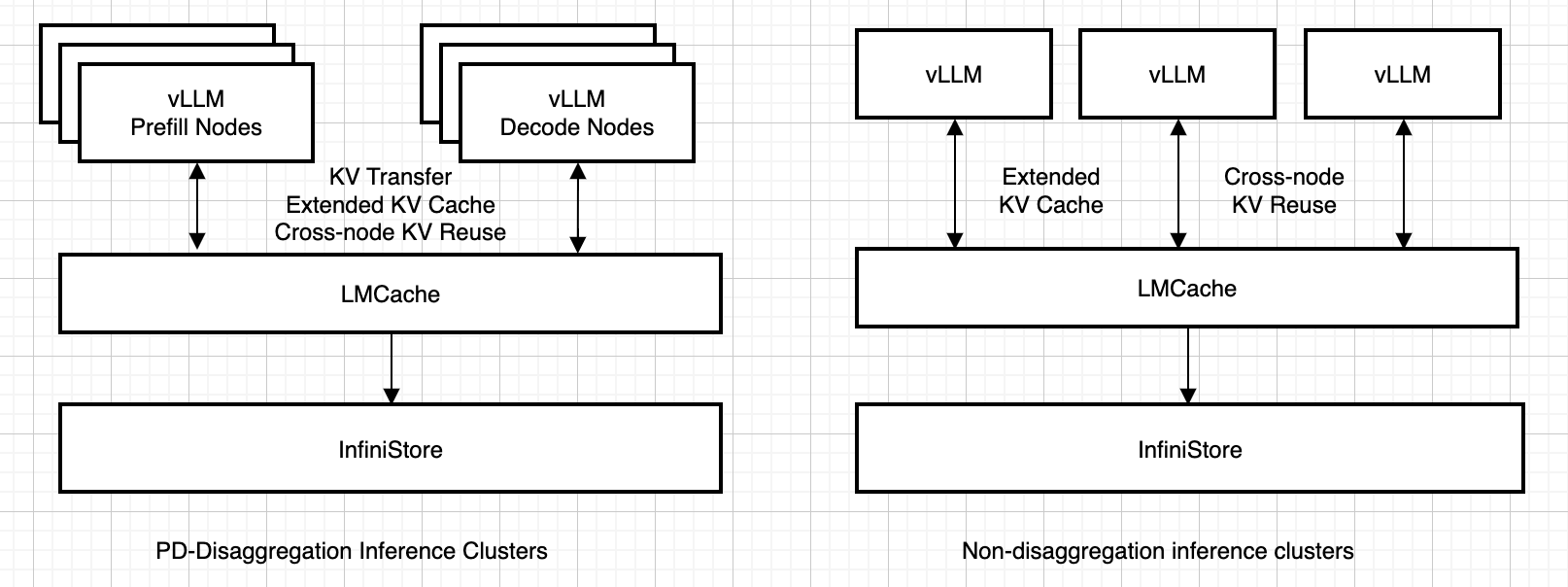
有关更多详细信息,请参阅 InfiniStore 文档。
InfiniStore 支持 RDMA 和 TCP 作为传输方式。LMCache 的 InfiniStore 连接器仅使用 RDMA 传输。
快速开始#
通过 pip 安装 InfiniStore:
pip install infinistore
该软件包包括 InfiniStore 服务器和 Python 绑定。
要从源代码构建 InfiniStore,请按照 GitHub 仓库 中的说明进行操作。
设置和部署#
前提条件:
具有至少一个 GPU 的机器用于 vLLM 推理
支持 RDMA 的网络硬件和驱动程序
Python 3.8+ 和 pip
已安装 vLLM 和 LMCache
步骤 1:启动 InfiniStore 服务器
对于基于 InfiniBand 的 RDMA:
infinistore --service-port 12345 --dev-name mlx5_0 --link-type IB
对于基于 RoCE 的 RDMA:
infinistore --service-port 12345 --dev-name mlx5_0 --link-type Ethernet
您还可以指定 --hint-gid-index 选项来设置 InfiniStore 服务器的 GID 索引。当您处于 k8s 管理的环境中时,这非常有用。
步骤 2:创建配置文件
创建你的 infinistore-config.yaml:
chunk_size: 256
remote_url: "infinistore://127.0.0.1:12345/?device=mlx5_1"
remote_serde: "naive"
local_cpu: False
max_local_cpu_size: 5
步骤 3:使用 InfiniStore 启动 vLLM
LMCACHE_CONFIG_FILE="infinistore-config.yaml" \
vllm serve \
    Qwen/Qwen2.5-7B-Instruct \
    --seed 42 \
    --max-model-len 16384 \
    --gpu-memory-utilization 0.8 \
    --kv-transfer-config \
    '{"kv_connector":"LMCacheConnectorV1", "kv_role":"kv_both"}'
步骤 4:验证设置
使用示例请求测试集成:
curl -X POST "http://localhost:8000/v1/completions" \
     -H "Content-Type: application/json" \
     -d '{
       "model": "Qwen/Qwen2.5-7B-Instruct",
       "prompt": "The future of AI is",
       "max_tokens": 100,
       "temperature": 0.7
     }'
调试提示:
启用详细日志记录:
infinistore --log-level=debug检查服务器状态:
# Check if the server is running
ps aux | grep infinistore
netstat -tlnp | grep -E "12345"
查询 TTFT 改进#
一旦 OpenAI 兼容的服务器运行起来,我们就可以查询两次,看看 TTFT 的改进。
使用以下参数运行 vLLM 的服务基准测试两次:
vllm bench serve \
    --backend vllm \
    --model Qwen/Qwen2.5-7B-Instruct \
    --num-prompts 50 \
    --port 8000 \
    --host 127.0.0.1 \
    --dataset-name random \
    --random-input-len 8192 \
    --random-output-len 128 \
    --seed 42
示例输出:
首次运行时,您可能会看到:
============ Serving Benchmark Result ============
Successful requests:                     50
Benchmark duration (s):                  80.97
Total input tokens:                      409544
Total generated tokens:                  6273
Request throughput (req/s):              0.62
Output token throughput (tok/s):         77.48
Total Token throughput (tok/s):          5135.74
---------------Time to First Token----------------
Mean TTFT (ms):                          36203.54
Median TTFT (ms):                        34598.91
P99 TTFT (ms):                           76010.91
-----Time per Output Token (excl. 1st token)------
Mean TPOT (ms):                          290.30
Median TPOT (ms):                        346.25
P99 TPOT (ms):                           412.24
---------------Inter-token Latency----------------
Mean ITL (ms):                           290.30
Median ITL (ms):                         386.78
P99 ITL (ms):                            449.83
对于第二次运行,您应该看到 TTFT 有显著减少:
============ Serving Benchmark Result ============
Successful requests:                     50
Benchmark duration (s):                  15.14
Total input tokens:                      409544
Total generated tokens:                  6273
Request throughput (req/s):              3.30
Output token throughput (tok/s):         414.22
Total Token throughput (tok/s):          27457.55
---------------Time to First Token----------------
Mean TTFT (ms):                          2880.53
Median TTFT (ms):                        3118.50
P99 TTFT (ms):                           12027.24
-----Time per Output Token (excl. 1st token)------
Mean TPOT (ms):                          73.81
Median TPOT (ms):                        71.12
P99 TPOT (ms):                           91.24
---------------Inter-token Latency----------------
Mean ITL (ms):                           73.81
Median ITL (ms):                         63.86
P99 ITL (ms):                            565.44
TTFT 改进:33.323 秒(快 12.6 倍)。
提示:
如果您想多次运行 vLLM 的服务基准测试,您需要重启 vLLM LMCache 服务器和 InfiniStore 服务器,或者每次将
--seed参数更改为不同的值,因为您已经预热了 LMCache。这里的基准测试结果是通过运行一个具有 48GB 显存的 L40,并使用
--gpu-memory-utilization 0.8生成的。您可以调整显存利用率并增加最大模型长度,以使用更多的长上下文。随着上下文长度的增加,LMCache 的 TTFT 改进变得更加明显!