lmcache bench#
The lmcache bench command runs performance benchmarks, quality tests, and
offline cache analyses. It has five sub-commands, each targeting a different
layer of the stack:
子命令 |
描述 |
|---|---|
|
使用多种 KV Cache 重用模式的工作负载对推理引擎(例如 vLLM)进行基准测试。 |
|
针对正在运行的 LMCache MP 缓存服务器(ZMQ + HTTP)的端到端健全性测试。需要完整安装 |
|
针对 L2 缓存适配器的吞吐量/延迟基准测试(存储/查找/加载)。 |
|
Checks whether a serving change (quantization, KV reuse such as
CacheBlend, another engine) changes the model's answers against a
reference, and gives a PASS / FAIL / UNDERPOWERED / INVALID verdict.
Two stages: |
|
Offline replay of a recorded request trace through a simulated cache: prefix and CacheBlend hit tokens over a capacity and chunk-size grid, as an HTML report. |
lmcache bench {engine,server,l2,quality,trace-analyze} [options]
engine#
The lmcache bench engine command runs sustained performance benchmarks
against an inference engine (e.g., vLLM). It supports multiple workload types
that exercise different caching patterns and reports TTFT, decoding speed, and
throughput metrics. TTFT starts at the first non-empty content or reasoning
text, including streams with an empty content field. One workload,
rag-qa-quality, measures answer correctness
instead of speed.
lmcache bench engine [options]
配置基准测试有三种方法:
CLI 参数 -- 在命令行中传递所有选项。
交互模式 -- 在不传入必需参数的情况下运行
lmcache bench engine,然后按照逐步提示进行操作。配置文件 -- 将配置保存为 JSON 并使用
--config进行重放。
快速开始#
最小示例(包含所有必需参数):
lmcache bench engine \
    --engine-url http://localhost:8000 \
    --workload long-doc-qa \
    --lmcache-url http://localhost:8080
交互模式(引导设置):
lmcache bench engine
交互模式会引导您逐一完成每项必需设置,然后询问是否需要配置通用选项和工作负载专项选项,或者直接使用默认值。
从保存的配置文件中:
lmcache bench engine --engine-url http://localhost:8000 \
    --config my_bench.json
配置文件包含基准测试参数(工作负载、KV Cache 设置等),但不包含引擎 URL,因此同一份配置可以在不同引擎上复用。
导出配置而不运行基准测试:
lmcache bench engine \
    --engine-url http://localhost:8000 \
    --workload long-doc-qa \
    --lmcache-url http://localhost:8080 \
    --export-config my_bench.json
此操作会解析所有自动检测到的值(模型名称、每 GB 的 token 数),并将其保存为可移植的 JSON 文件,无需 LMCache 服务器即可使用。
非交互模式(用于脚本和 CI):
lmcache bench engine \
    --engine-url http://localhost:8000 \
    --workload long-doc-qa \
    --lmcache-url http://localhost:8080 \
    --no-interactive
若缺少任何必需参数,立即报错而非进入交互模式,适用于自动化流水线。
如果您没有 LMCache 服务器,可以直接传递 --tokens-per-gb-kvcache,而不是 --lmcache-url(有关如何找到此值,请参见 查找 --tokens-per-gb-kvcache)。
常规选项#
标志 |
必需的 |
描述 |
|---|---|---|
|
不 |
从 JSON 文件加载配置,跳过交互模式。命令行参数会覆盖文件中的值。引擎 URL 不存储于配置文件中,需单独提供。 |
|
不 |
将已解析的配置导出到 JSON 文件后退出,不会执行基准测试。自动检测的值(模型名称、每 GB 的 token 数)会被解析并保存,使配置具有可移植性。特定于环境的值(引擎 URL、LMCache URL)不会被导出。 |
|
不 |
禁用交互模式。若缺少必需参数则立即报错,而非进行提示。适合在脚本和 CI 中使用。 |
|
是 |
推理引擎 URL(例如 |
|
是 |
Workload type: |
|
* |
每 GB KV Cache 的 token 数。除非已设置 |
|
不 |
LMCache HTTP 服务器 URL。若提供此参数, |
|
不 |
模型名称。若省略,将自动从引擎检测。 |
|
不 |
目标活跃 KV Cache 容量,单位为 GB(默认值:100)。 |
|
不 |
随机种子(默认值:42)。 |
|
不 |
CSV 和 JSON 输出文件的保存目录(默认:当前目录)。 |
|
不 |
跳过 CSV 导出。 |
|
不 |
导出 JSON 摘要文件。 |
|
不 |
禁止显示实时进度。 |
|
不 |
Skip the warmup phase and start measuring immediately. See Warmup Phase. |
查找 --tokens-per-gb-kvcache#
如果已有正在运行的 LMCache 服务器,最简便的方法是传递 --lmcache-url,让工具自动检测该值。
如果正在使用 不带 LMCache 的 vLLM,请在 vLLM 的启动日志中查找以下行:
INFO: Available KV cache memory: 12.34 GiB
INFO: GPU KV cache size: 567,890 tokens
然后计算:
tokens_per_gb = 567890 / 12.34 = 46,020
Warmup Phase#
Most workloads run a warmup phase before the measured run. What it sends is
workload-specific -- long-doc-qa prefills each document, rag-qa-quality
prefills each document behind the system block, prefix-suffix-tuner sends a
full pass over its prefix pool, multi-round-chat primes each session, and
long-doc-permutator sends a single dummy request, and kv-tier-pressure
sweeps its whole document pool once. random-prefill has no warmup at all.
Warmup requests are sent with max_tokens=1 and their stats are discarded,
so they never appear in the reported numbers.
Warmup serves two purposes: it absorbs the engine's one-time first-request cost
(torch.compile, CUDA-graph capture, weight paging), and -- for the workloads
that prefill their data -- it puts the KV cache in the state the measured run is
designed to exercise.
--no-warmup skips the phase entirely and starts measuring immediately:
lmcache bench engine \
    --engine-url http://localhost:8000 \
    --workload long-doc-qa \
    --lmcache-url http://localhost:8080 \
    --no-warmup
Use it to measure a cold start -- what the first requests against a fresh engine and an empty cache actually cost -- or to shorten a smoke test where the absolute numbers do not matter.
警告
Do not compare a --no-warmup run against a warmed run: the numbers
measure different things. Without warmup, the first requests pay the
engine's first-request cost and read from a cold cache, which inflates TTFT
and depresses cache hit rate.
For workloads whose warmup populates the data they then measure reuse of
(long-doc-qa, rag-qa-quality, prefix-suffix-tuner,
multi-round-chat), skipping it removes the reuse the workload was built
to measure. prefix-suffix-tuner in particular reports pass-2 results
against a cache that pass 1 was supposed to fill, so its output is not
meaningful with --no-warmup.
工作负载#
long-doc-qa#
模拟对长文档的重复问答。预热阶段将每个文档发送一次以填充 KV Cache,然后以信号量控制的并发方式派发基准测试查询。
标志 |
默认 |
描述 |
|---|---|---|
|
10000 |
每个合成文档的 token 长度。 |
|
2 |
每个文档的提问数量。 |
|
随机 |
请求排序方式: |
|
3 |
最大并发在途请求数。 |
示例:
lmcache bench engine \
    --engine-url http://localhost:8000 \
    --workload long-doc-qa \
    --lmcache-url http://localhost:8080 \
    --kv-cache-volume 50 \
    --ldqa-document-length 8000 \
    --ldqa-query-per-document 4 \
    --ldqa-shuffle-policy tile
multi-round-chat#
模拟有状态的多轮聊天。创建并发用户会话,以固定 QPS 速率调度请求,并将响应记录到会话历史中,使每个后续查询都包含先前的上下文。
标志 |
默认 |
描述 |
|---|---|---|
|
2000 |
每个会话的系统提示 token 长度。 |
|
10000 |
预填充的聊天历史 token 长度。 |
|
50 |
每个用户查询的 token 数。 |
|
200 |
每个响应最多生成的 token 数。 |
|
1.0 |
每秒目标查询数。 |
|
60.0 |
基准测试持续时间,单位为秒。 |
示例:
lmcache bench engine \
    --engine-url http://localhost:8000 \
    --workload multi-round-chat \
    --lmcache-url http://localhost:8080 \
    --mrc-qps 2.0 \
    --mrc-duration 120
long-doc-permutator#
通过发送一组上下文文档的不同排列,对混合 KV Cache 的重用进行压力测试。每个请求以不同顺序拼接所有上下文文档:
[System Prompt] + [Doc_i1] + [Doc_i2] + ... + [Doc_iN]
基准测试阶段开始前会发送一个虚拟预热请求。请求以信号量控制并发方式派发。
标志 |
默认 |
描述 |
|---|---|---|
|
5 |
独立上下文文档的数量。 |
|
5000 |
每个上下文文档的 token 长度。 |
|
1000 |
共享系统提示的 token 长度。使用 |
|
10 |
发送的不同排列数量,上限为 N!(其中 N = |
|
1 |
最大并发在途请求数。 |
|
128 |
Maximum tokens to generate per permutation request. Use |
示例:
lmcache bench engine \
    --engine-url http://localhost:8000 \
    --workload long-doc-permutator \
    --lmcache-url http://localhost:8080 \
    --ldp-num-contexts 4 \
    --ldp-context-length 8000 \
    --ldp-num-permutations 24 \
    --ldp-num-inflight-requests 2
kv-tier-pressure#
Exercises the L2 storage tier. Where long-doc-permutator puts every
document in every request -- so the distinct working set equals one prompt and
can never overflow L1 -- this workload keeps a document pool larger than the
cache and samples a subset into each request:
[System Prompt] + [Doc_a] + [Doc_b] + ... + [Doc_k] (k of D, k << D)
重要
This workload assumes CacheBlend (enable_blending). Each request
concatenates a random subset of the pool in random order, so without
blending a document is reused only when everything before it in the prompt
also matches — which these prompts almost never satisfy. Such a run writes
a great deal to storage and reads very little back, while the share of
reads served by storage still looks healthy.
Watch cache-hit tokens per request, reported whenever --lmcache-url
is given, rather than the storage read share — the share is a ratio between
tiers and cannot tell the two cases apart.
Without blending, use --ktp-docs-per-request 1. Each prompt is then
[system prompt][document], which is prefix-stable and reuses normally.
When --lmcache-url is given the workload verifies this for you. After
the warm-up sweep it checks which lookup counter family moved: the blend
counters move only when the server runs the blend module and vLLM drives
it through CBKVConnector. If a multi-document run was not blended it
stops there, rather than producing a result that looks reasonable and
means nothing.
--ktp-pool-size is what decides whether the storage tier is reached: the
working set is pool_size x --ktp-context-length tokens, and only what
exceeds cache capacity can be evicted and read back. Omit it and the pool is
sized automatically from the capacity the LMCache server reports via
--lmcache-url, multiplied by --ktp-overflow-factor. To size it by hand
against a cache of V GB with a factor of F:
pool_size = ceil(F * V * tokens_per_gb_kvcache / context_length)
tokens_per_gb_kvcache comes from the engine's KV layout and is resolved
automatically from --lmcache-url (see 查找 --tokens-per-gb-kvcache). An
F of 2 means half the working set cannot be resident, so roughly half of
all cache reads must come from L2.
Treat that only as a dial. The idealised share 1 - 1 / F assumes pure LRU
over uniformly-drawn whole documents and ignores prefetch re-admission and
chunk-level sharing: 45% was measured at F = 1 on one stack and 36% at
F = 2 on another. Size the pool with it, then read the share that actually
occurred from the cache's tier counters.
Warmup is a deterministic sweep: the pool is partitioned into
ceil(pool_size / docs_per_request) non-overlapping groups and each is sent
once, so every document is cached exactly once before measurement. This matters
because until L1 fills there is no eviction and therefore no L2 read -- a share
measured across a cold start describes run length, not the system.
标志 |
默认 |
描述 |
|---|---|---|
|
derived |
Total documents in the corpus. Sets the working set, and therefore
whether the storage tier is reached. Derived from the server's cache
capacity and |
|
2.0 |
Working set as a multiple of the server's cache capacity. Used only
when |
|
16 |
Documents sampled into each request. Bounded by the engine's context limit, not by the pool size. |
|
2560 |
Token length of each document (10 whole 256-token chunks). |
|
256 |
Token length of the shared system prompt. Use |
|
200 |
Number of measured requests. The warmup sweep is separate and sized automatically from the pool. |
|
0.0 |
Zipf exponent for document popularity. |
|
8 |
最大并发在途请求数。 |
|
1 |
Maximum tokens to generate per request. The default isolates prefill, the phase the cache tier affects; larger values add decode time that dilutes the measurement. |
The run reports a Document pool section alongside the standard metrics, giving the resolved pool size, working set, access skew and sweep size. These are inputs: the share of reads actually served by L2 comes from the cache's own tier counters, not from this workload.
Example -- target ~50% of cache reads from L2 against a 100 GB L1:
lmcache bench engine \
    --engine-url http://localhost:8000 \
    --workload kv-tier-pressure \
    --lmcache-url http://localhost:8080 \
    --ktp-pool-size 910 \
    --ktp-docs-per-request 16 \
    --ktp-context-length 2560 \
    --ktp-num-requests 200
Raise --ktp-pool-size for a larger share of reads from storage, and keep
it pinned when reproducing an earlier run so the corpus is identical.
prefix-suffix-tuner#
一个两遍顺序工作负载,设计为在三种 LMCache 配置下 不做任何修改 地运行,以展示各缓存层级(L0 HBM、L1 DRAM、L2 磁盘)的价值:
基线 |
LMCache 配置 |
目标溢出 |
预期的 pass-2 命中 |
|---|---|---|---|
1 |
原生 vLLM (仅 L0) |
L0 (HBM) |
无 —— 每个请求均为冷预填充 |
2 |
vLLM + LMCache L1 + L2 |
L1 (DRAM) |
L2 前缀命中(后缀重计算) |
3 |
vLLM + LMCache L1 + L2 + CacheBlend |
L1 (DRAM) |
L2 前缀命中 + CacheBlend 后缀命中 |
将 --kv-cache-volume 设置为希望发生溢出的层的大小(基线 1 对应 L0 大小,基线 2 和 3 对应 L1 大小)。各基线的工作负载本身完全相同。
每个请求的布局:
[prefix_i with unique-ID][random breaker][shared suffix]
num_prefixes个不同的前缀,每个前缀以PREFIX_<8-hex>开头,以确保各前缀在池内的 token 化哈希各不相同。每个请求包含一段新的随机 32-token 分隔符,用于突破普通前缀缓存的前缀边界。
所有请求共享的单个后缀 —— 这是 CacheBlend 唯一能够重用的条目。
第 1 遍(预热)将每个前缀各发送一次以填充缓存,其统计数据被丢弃。第 2 遍以相同顺序再次发送。由于 LRU 在每次第 2 遍访问时会逐出下一个所需前缀,即使目标层仅溢出 1.05 倍,也足以使每个第 2 遍请求在该层未命中并降级到下一层。
标志 |
默认 |
描述 |
|---|---|---|
|
8000 |
每个请求的总 token 数(前缀 + 分隔符 + 后缀)。 |
|
0.8 |
前缀占上下文长度的比例,必须在 (0.0, 1.0) 区间内。剩余部分(减去 32 个 token 的分隔符)即为共享后缀。 |
|
20.0 |
要溢出的 KV Cache 层的大小(单位:GB)。 原生 vLLM 请使用 L0(HBM)大小;分层基线请使用 L1(LMCache DRAM)大小。工作负载的前缀池大小略大于此值(内部溢出 5%),足以在顺序调度 + LRU 条件下使每个 pass-2 请求在该层发生未命中。 |
pass-2(测量阶段)的请求数等于前缀池大小,计算公式为 floor(psf_thrash * 1.05 * tokens_per_gb / prefix_tokens)。此工作负载不使用 --kv-cache-volume,规模完全由 --psf-thrash 决定。
示例:
lmcache bench engine \
    --engine-url http://localhost:8000 \
    --workload prefix-suffix-tuner \
    --lmcache-url http://localhost:8080 \
    --psf-context-length 8000 \
    --psf-prefix-ratio 0.8 \
    --psf-thrash 100
备注
为使分析模型的论断“thrash ≈ L1 大小 → ~0% LMCache 命中率”在实验中成立,LMCache 服务器必须以 --eviction-ratio 0.99 启动(默认值 0.20 每个周期仅清除 20%,第 2 遍时约有 60% 的第 1 遍内容仍留存在缓存中):
lmcache server --l1-size-gb <SIZE> --eviction-policy LRU \
    --eviction-trigger-watermark 0.80 \
    --eviction-ratio 0.99
工作负载在第 1 遍(预热)和第 2 遍(测量)之间会休眠 5 秒,以便 LMCache 的 1Hz 批量逐出轮询线程有机会实际运行。若没有这段休眠,快速基准测试会在任何逐出触发之前就已完成。
rag-qa-quality#
Measures answer quality rather than speed: every other workload reports an unchanged number if the cache returns subtly wrong KV. Answers are scored against gold answers from a real QA dataset.
Each document is prefilled on its own during warmup; the measured request then composes them:
[system prompt][doc_a][doc_b]...[doc_n][question]
so every document is reused at a position it was never cached at -- the RAG serving pattern, with no artificial perturbation.
标志 |
默认 |
描述 |
|---|---|---|
|
required |
A known dataset name ( |
|
50 |
Questions to measure, taken in dataset order. |
|
1024 |
Token budget per answer. Must fit a reasoning model's thinking block as well as the answer tags. |
|
(未设置) |
Chat-template variables as |
|
|
Per-sample results file. |
--kv-cache-volume is unused, but --tokens-per-gb-kvcache (or
--lmcache-url) is still required. A tokenizer is required too, for chunk
alignment: pass --model, or let it auto-detect from /v1/models.
Datasets are not vendored. Named ones download from the HuggingFace Hub on
first use and cache under HF_HOME; any other value is a local path.
Name |
Source |
Notes |
|---|---|---|
|
|
JSONL, 20 passages per question, ~2.1k tokens. |
|
|
Parquet (distractor/validation); requires |
Local files load unchanged if their records carry passages, a question, and
gold answers -- ctxs[].{title,text}, paragraphs[].paragraph_text,
context, or the RAGAS hand-off fields retrieved_contexts,
user_input and reference. Records missing any of the three are
skipped.
Comparing two stacks. For CacheBlend against full recompute, use
lmcache bench quality, which runs both arms
(together or one at a time) and prints a verdict. For other pairs, run the
workload once per stack and diff the files by sample_id:
ARGS="--workload rag-qa-quality --tokens-per-gb-kvcache 6000 \
      --rag-dataset musique --rag-num-samples 20"

lmcache bench engine --engine-url http://localhost:8000 $ARGS --rag-output a.json
lmcache bench engine --engine-url http://localhost:8001 $ARGS --rag-output b.json
The files are comparable only when their ``run_fingerprint`` values match. It covers the selected samples' ids, rendered prompts and gold answers, along with the dataset path, budget, template kwargs, model, seed and chunk alignment. Editing a selected question, document or reference at the same dataset path changes the fingerprint; output paths and unmeasured records do not. Fingerprints from older versions that covered only sample ids are not comparable with these content-based fingerprints.
备注
Start each run from a clean cache -- restart the server, or
lmcache kvcache clear --url <mp-url> -- or the second run hits the
first run's cached composites instead of measuring per-document reuse.
备注
No cache-hit metrics are reported; quality is measured from the responses alone. To tell "quality unchanged" apart from "LMCache never engaged", check the engine's own counters around a run:
curl -s http://localhost:8080/metrics | grep lookup_.*_tokens_total
Reasoning models. --rag-template-kwargs has no default: disabling
thinking can lower multi-hop QA quality, and the right setting is
model-specific (enable_thinking=true, reasoning_effort=high). Too
small a budget cuts generation off before the closing tag, so the sample
does not parse and drops out of the score -- watch Parse rate.
random-prefill#
以 max_tokens=1 同时发送所有请求,用于测量纯预填充性能,无预热阶段。
标志 |
默认 |
描述 |
|---|---|---|
|
10000 |
每个预填充请求的 token 长度。 |
|
50 |
发送的请求总数。 |
示例:
lmcache bench engine \
    --engine-url http://localhost:8000 \
    --workload random-prefill \
    --lmcache-url http://localhost:8080 \
    --rp-request-length 15000 \
    --rp-num-requests 100
交互模式#
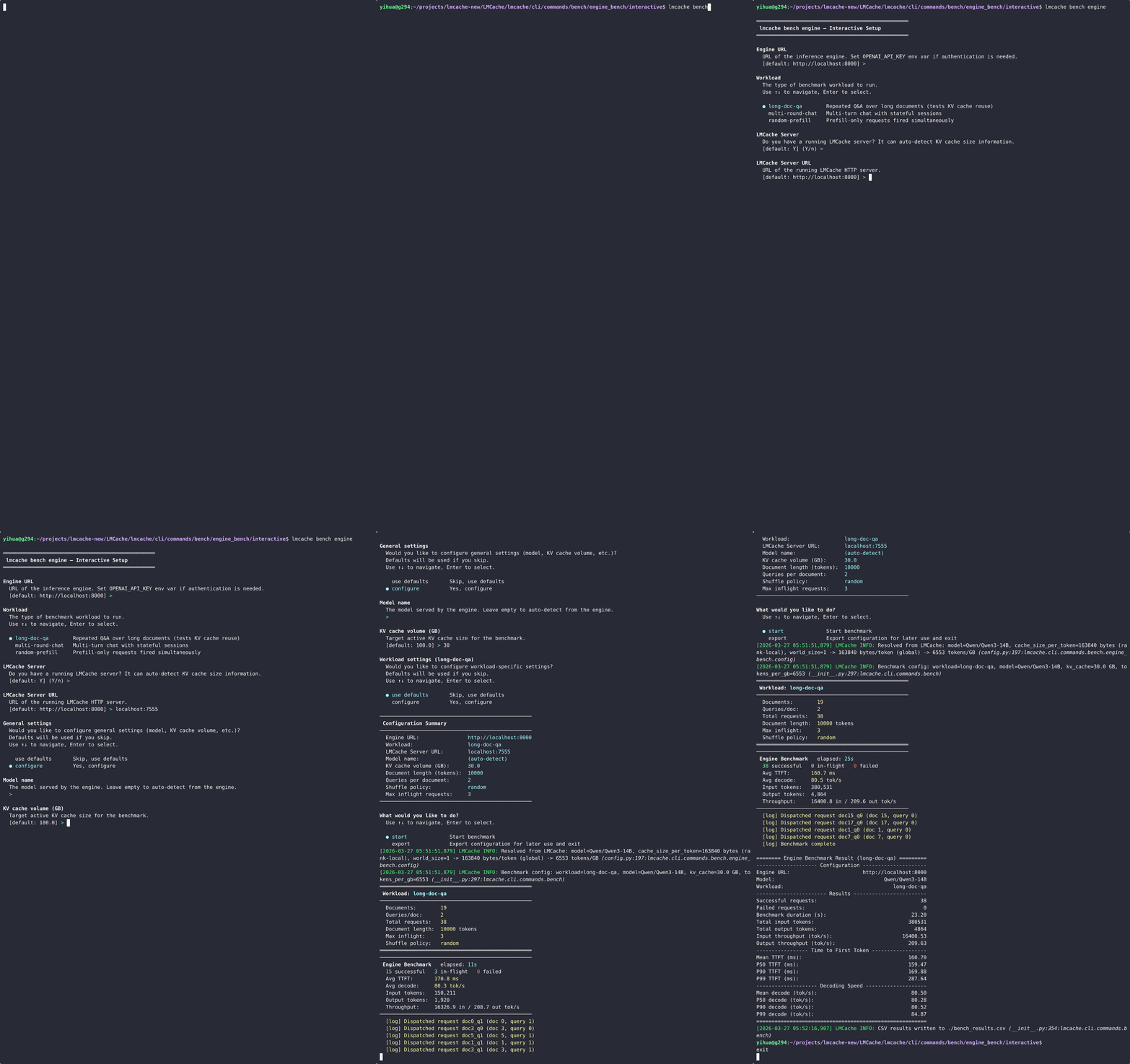
当未提供 --engine-url 或 --workload(且未设置 --no-interactive)时,工具将进入交互模式,引导您完成以下四个阶段:
必需设置 —— 引擎 URL、工作负载类型、LMCache 服务器(或每 GB 的 token 数)。
通用设置(可选)—— 模型名称、KV Cache 容量。
工作负载设置(可选)—— 工作负载专项参数。
摘要与操作 —— 审查配置,然后启动基准测试或将配置导出为 JSON 文件。
每个提示聚焦于单一设置。选择类提示使用方向键操作;文本和数字类提示接受键入输入,默认值显示在括号中。
══════════════════════════════════════════════════
 lmcache bench engine -- Interactive Setup
══════════════════════════════════════════════════

Engine URL
  URL of the inference engine.
  [default: http://localhost:8000] >

Workload
  The type of benchmark workload to run.
  Use up/down to navigate, Enter to select.

  * long-doc-qa           Repeated Q&A over long documents
    multi-round-chat       Multi-turn chat with stateful sessions
    long-doc-permutator    Permutations of context documents
    prefix-suffix-tuner    Two-pass tiered KV-cache demonstrator
    rag-qa-quality         Answer quality (F1) on real QA data
    random-prefill         Prefill-only requests fired simultaneously

LMCache Server
  Do you have a running LMCache server?
  It can auto-detect KV cache size information.
  [default: Y] (Y/n) >

...

──────────────────────────────────────────────────
 Configuration Summary
──────────────────────────────────────────────────
  Workload:             long-doc-qa
  Model:                Qwen/Qwen3-14B
  Tokens per GB:        6553
  ...
──────────────────────────────────────────────────

What would you like to do?
  * Start benchmark
    Export configuration for later use and exit
当您选择“导出配置”时,所有自动检测到的值(模型名称、每 GB 的 token 数)将被解析并保存为可移植的 JSON 文件。
配置文件#
配置文件存储基准测试参数,但不存储特定于环境的值(如引擎 URL 或 LMCache URL),以便同一份配置可在不同环境下复用。
您可以通过三种方式创建配置文件:
交互模式 -- 在摘要步骤选择“导出配置”。
``--export-config`` -- 从 CLI 解析并导出,而不运行。
手动编写 —— 编写 JSON,键名与 CLI 参数名称对应(将连字符替换为下划线)。
示例配置文件:
{
  "model": "Qwen/Qwen3-14B",
  "workload": "long-doc-qa",
  "tokens_per_gb_kvcache": 6553,
  "kv_cache_volume": 100.0,
  "ldqa_document_length": 10000,
  "ldqa_query_per_document": 2,
  "ldqa_shuffle_policy": "random",
  "ldqa_num_inflight_requests": 3
}
通过 --config 加载该配置文件(引擎 URL 需单独提供):
lmcache bench engine --engine-url http://localhost:8000 \
    --config my_bench.json
命令行参数会覆盖配置文件中的值,因此可以以基础配置为模板,按需调整个别设置:
# Use saved config but override KV cache volume
lmcache bench engine --engine-url http://localhost:8000 \
    --config my_bench.json --kv-cache-volume 200
输出#
终端(实时进度)#
基准测试运行期间,实时进度面板会展示在途请求数、平均 TTFT、解码速度和吞吐量。可通过 -q 禁止显示。
终端(最终摘要)#
完成后,将打印一个摘要表:
======= Engine Benchmark Result (long-doc-qa) ========
---------------------- Configuration ------------------
Engine URL:                       http://localhost:8000
Model:                            Qwen/Qwen3-14B
Workload:                         long-doc-qa
------------------------- Results ---------------------
Successful requests:              20
Failed requests:                  0
Benchmark duration (s):           31.34
Total input tokens:               200000
Total output tokens:              2560
Input throughput (tok/s):         6381.62
Output throughput (tok/s):        81.69
--------------- Time to First Token -------------------
Mean TTFT (ms):                   313.41
P50 TTFT (ms):                    272.83
P90 TTFT (ms):                    587.21
P99 TTFT (ms):                    837.32
------------------ Decoding Speed ---------------------
Mean decode (tok/s):              48.23
P99 decode (tok/s):               38.55
======================================================
A workload may append sections of its own after the shared ones.
rag-qa-quality adds Answer Quality:
-------------------- Answer Quality --------------------
Samples measured:                                     20
Samples scored:                                       20
Parse rate:                                         1.00
Mean F1 (scored only):                              0.31
Run fingerprint:                        61709aae928fdba8
Field |
含义 |
|---|---|
|
Questions sent. |
|
Of those, how many produced a complete |
|
|
|
SQuAD-normalized token-overlap F1, best over the gold answers, averaged over scored samples only. Always read it together with the parse rate: a high F1 over a third of the samples is a different result from the same F1 over all of them. |
|
Digest of everything determining the prompts. Two runs are comparable only when these match. |
CSV 和 JSON#
bench_results.csv—— 每个请求的指标(TTFT、延迟、解码速度、token 计数)。默认写入;可通过--no-csv跳过。bench_summary.json—— 聚合统计数据,包含百分位数和配置元数据。通过--json选项启用。
两个文件均写入 --output-dir 指定的目录(默认:当前目录)。
Per-sample quality results#
rag-qa-quality additionally writes its own file to --rag-output:
{
  "run_fingerprint": "61709aae928fdba8",
  "model": "meta-llama/Llama-3.1-8B-Instruct",
  "config": {"dataset": "musique", "num_samples": 20, "max_output_length": 256,
             "template_kwargs": {}, "output_path": "a.json"},
  "summary": {"num_samples": 20, "num_parsed": 20, "parse_rate": 1.0,
              "f1_mean": 0.3144},
  "per_sample": [
    {"sample_id": "2hop__481349_302087", "f1": 0.6667, "parsed": true,
     "answer": "Bombardier Aerospace", "ttft": 0.1624, "num_output_tokens": 26},
    {"sample_id": "2hop__697790_864352", "f1": null, "parsed": false,
     "answer": "", "ttft": 0.1701, "num_output_tokens": 256}
  ]
}
An unparsed sample's f1 is null, not 0.0 -- so a cross-run
diff can pair by sample_id and skip what either run failed to score,
rather than averaging a parsing failure in as a wrong answer.
退出代码#
代码 |
含义 |
|---|---|
|
所有请求均成功。 |
|
一个或多个请求失败。 |
server#
The lmcache bench server command is an end-to-end sanity test for the
LMCache Multi-Process (MP) cache server. It connects to a running server
over ZMQ and exercises the full KV-cache data path for a sequence of
synthetic requests, then verifies per-chunk checksums in local worker buffers.
lmcache bench server [options]
Unlike lmcache bench engine, this command does
not require an inference engine. It only needs a running LMCache MP
server (ZMQ). GPU mode additionally requires a CUDA-capable device.
It also requires the full lmcache install (not the lightweight
lmcache-cli package).
它的功能#
For each sequence in [--start, --end), the tool runs two passes. Each
pass reserves request-exclusive KV blocks and releases them when it finishes.
Cold pass --
LOOKUPis expected to miss. The benchmark fills request blocks with deterministic KV and records local per-chunk checksums beforeSTORE.Warm pass --
LOOKUPis expected to hit. The benchmark clears the allocated destination blocks, retrieves the cached KV, and compares each reader's checksums with the cold-pass reference. The two passes may use different physical block IDs.
完整的 RPC 路径是:
REGISTER_KV_CACHE → GET_CHUNK_SIZE → LOOKUP
  → QUERY_PREFETCH_STATUS → RETRIEVE → STORE
  → END_SESSION
Both transfer modes verify local buffers. In lmcache_driven mode, --url
also enables server checksum comparisons before STORE and after RETRIEVE,
reported separately. HTTP failures or mismatches fail this check. An empty
--url disables HTTP checks; engine_driven mode skips them.
STORE/RETRIEVE runs enabled workers concurrently; latency covers dispatch through
completion of all workers. --transfer-timeout bounds each call's wait. After a
timeout or transfer exception, close the client before reuse. Shutdown waits for
running transfers and may block if a native call hangs.
快速开始#
在一个终端中启动 MP 服务器:
lmcache server \
    --host localhost --port 15556 \
    --chunk-size 256 --l1-size-gb 5 \
    --eviction-policy LRU --max-workers 1
然后在另一个终端中:
lmcache bench server \
    --rpc-url tcp://localhost:15556 \
    --url http://localhost:8080
默认情况下该工具会持续运行(--end 未设置);可随时使用 Ctrl-C 停止。传递 --end N 可限定运行次数。
选项#
标志 |
默认 |
描述 |
|---|---|---|
|
|
MP 模式缓存服务器的 ZMQ 端点。 |
|
|
HTTP endpoint for checksum verification in |
|
|
Run mode. |
|
|
用于 STORE/RETRIEVE 的传输路由。 |
|
|
GPU mode only. Use the IPC mechanisms for containers that share no
host IPC namespace or |
|
|
每个合成请求的 token 数。 |
|
|
Allocate the lowest free block IDs or sample from all free IDs. |
|
|
Positive, finite wait budget for each STORE or RETRIEVE call. |
|
|
Fallback block capacity per KV group; overridden by the shape spec. |
|
|
Fallback tokens per block; overridden by the shape spec. |
|
|
运行的第一个序列号。 |
|
(未设置) |
序列号的独占上限,省略时循环将无限运行。 |
|
|
连续子通道之间的延迟。 |
|
|
Number of clients sending requests at the same time (see below). |
|
|
KV Cache 形状规格(见下文)。 |
|
|
最终指标摘要的标准输出格式。可用格式: |
|
(未设置) |
将最终的指标摘要保存到 PATH 指定的文件中(格式由 |
|
(未设置) |
在运行期间抑制所有进度消息。仅输出最终的结构化指标摘要(除非也通过 |
Block allocation#
Each KV group has an independent block pool. Active requests reserve exclusive blocks; all TP ranks use the same block IDs for a group in their separate KV buffers. Each concurrent client owns its own pools. Blocks are currently not shared between requests, even when their token prefixes match.
--block-allocation sequential selects the lowest free IDs; random
samples free IDs to exercise non-contiguous block mappings. Blocks become
reusable after request release. Allocation fails immediately if any group
lacks capacity, without reserving blocks in other groups.
Capacity and block size come from NB and BS in
--kvcache-shape-spec, overriding --num-blocks and --block-size.
For example, 512 tokens in complete chunks with a block size of 16 require
32 blocks per group.
If transfer completion is uncertain, the client rejects further operations and retains its blocks until teardown.
CPU 模式(无 GPU)#
--mode cpu runs the same end-to-end path without a GPU. The server
runs on a CPU-only host (StubCPUDevice); the bench tool allocates regular
CPU KV tensors and exercises the full RPC path through TransferContext.
The engine-driven context uses server-owned SHM staging when available and
falls back to typed inline tensor transport. In lmcache_driven mode, the CPU wrapper
migrates the tensors to POSIX SHM during registration.
By default --mode cpu uses the engine-driven gather/scatter path
(auto → cpu→engine_driven); that path requires the server to
be started with --supported-transfer-mode engine_driven or
auto, since the server's default lmcache_driven does not load
it. To use the zero-copy SHM handle path instead, pass
--transfer-mode lmcache_driven:
# Terminal 1 -- start the LMCache server (no GPU required)
lmcache server \
    --host localhost --port 5555 \
    --l1-size-gb 2 --eviction-policy LRU

# Terminal 2 -- run bench in CPU + lmcache_driven mode
lmcache bench server \
    --rpc-url tcp://localhost:5555 \
    --url http://localhost:8080 \
    --mode cpu --transfer-mode lmcache_driven \
    --start 0 --end 2
KV 缓存形状规格#
--kvcache-shape-spec 参数描述 KV 张量在 GPU 上的布局,规格由一个或多个以 ; 分隔的组构成:
(kv_size,NB,BS,NH,HS):dtype:layers[;(...):dtype:layers...]
字段:
kv_size—— 经典注意力机制(独立 K/V)为 2,MLA 为 1。NB—— 分页块数量。BS—— 块大小(每块的 token 数)。NH—— 每层的注意力头数量。HS—— 注意力头大小(以元素为单位)。dtype—— 元素数据类型(例如float16、bfloat16、float32、uint8),完整集合与lmcache/v1/kv_layer_groups.py中DTYPE_MAP的键一致。layers—— 该组包含的层数。
多组规格支持对异构层建模(例如,同一模型中同时包含 MLA 层和经典注意力层):
lmcache bench server \
    --rpc-url tcp://localhost:15556 \
    --kvcache-shape-spec "(1,1024,16,1,128):float16:4;(2,1024,16,8,128):float16:28"
所有组必须共享相同的 NB 和 BS(这是分页 KV 的物理约束),各组层数之和等于向服务器注册的总层数。
MLA (Multi-head Latent Attention)#
Set kv_size=1 to exercise the MLA data path. MLA folds K and V into
a single latent plane, so each chunk on the wire is
(num_layers, chunk_tokens, num_heads * head_size) instead of the
classical (2, num_layers, chunk_tokens, num_heads * head_size).
The bench also allocates each per-layer client tensor as rank-3
(NB, BS, num_heads * head_size) (rather than the classical rank-5
(2, NB, BS, NH, HS)), which is what the server's vLLM detector
recognises as MLA -- see NL_X_NB_BS_HS in
lmcache/v1/gpu_connector/kv_format/detectors/vllm.py.
Pure MLA example (DeepSeek-V2-style, 61 layers, single latent head):
lmcache bench server \
    --rpc-url tcp://localhost:15556 \
    --kvcache-shape-spec "(1,1024,16,1,128):bfloat16:61"
Both transfer modes support MLA:
lmcache_driven(GPU default / CPU opt-in): the server discoversuse_mlafrom the registered tensor shapes -- the bench's rank-3 MLA client tensors trip this automatically.engine_driven(CPU default): the bench derivesuse_mlafrom the tensor layout throughTransferContext, so the server sizes its SHM chunks correctly.
备注
Heterogeneous specs that mix kv_size=1 and kv_size=2 groups
are supported in lmcache_driven mode -- each layer's rank (3 vs. 5)
tells the detector which per-group KV format to use. engine_driven
currently supports one KV group per context; use lmcache_driven for
heterogeneous or hybrid KV groups.
Tensor Parallel (TP > 1)#
--tp-size N (default: 1) simulates a TP world of N vLLM
workers against a single LMCache server. Each rank registers its own
KV cache under a distinct instance_id, so the server holds one
context per rank -- exactly the layout LMCacheMPWorkerAdapter
creates in a real deployment. Fan-out for the store / retrieve /
lookup ops mirrors ParallelStrategy from the vLLM adapter:
LOOKUPfires exactly once per request (scheduler-scoped,worker_id=None).RETRIEVEfires on every rank -- each worker loads its own KV shard back.STOREfires on KV writers only. Non-MLA: every rank is a writer. MLA: only rank 0 is a writer (the latent plane is shared across ranks; storing from every rank would just re-write identical bytes).
Example: MLA + TP=2, exercising rank 0 STORE + both-rank RETRIEVE:
lmcache bench server \
    --rpc-url tcp://localhost:15556 \
    --mode cpu --transfer-mode lmcache_driven \
    --kvcache-shape-spec "(1,1024,16,1,128):bfloat16:8" \
    --tp-size 2
Replicated readers use their writer's KV identity for deterministic filling. The bench verifies retrieved data on every rank and reports the rank and chunk for checksum mismatches.
完整的解析规则和验证错误说明请参阅 lmcache/v1/kv_layer_groups.py 中的 parse_kvcache_shape_spec。
Concurrent clients#
With the default --concurrency 1 a single client sends one request at a
time, so the run measures per-request latency but never queues work on the
server. --concurrency N runs N clients in parallel, each with its own
connection and KV tensors, and its Workers registered under their own
instance_id block. Sequences are dealt round-robin (client k runs
start + k, start + k + N, ...), so no two clients touch the same
keys and the cold/warm checks stay valid.
lmcache bench server \
    --rpc-url tcp://localhost:5555 --mode cpu \
    --start 0 --end 400 --interval 0 --concurrency 8
The summary adds Concurrency, Elapsed (s), and Requests / s.
Use --interval 0 when comparing throughput, otherwise the delay
dominates. Requests / s counts cold/warm sequence pairs, matching
Total requests.
Size the server's L1 to hold the whole run. If stores arrive faster than the eviction controller frees memory, the server drops them, and the affected warm lookups miss and fail their checks.
对服务器进行性能分析#
lmcache bench server 是一个 ZMQ 客户端:它所使用的存储路径(哈希、分配、收集、D2H)在 server 进程内部运行,而不是在这个基准测试中。因此,--flamegraph on 会将分析器附加到您提供的服务器进程 ID,记录负载持续时间,并渲染服务器的火焰图,而不是客户端的火焰图。
lmcache bench server \
    --rpc-url tcp://localhost:5555 \
    --start 0 --end 200 --interval 0.02 \
    --flamegraph on --flamegraph-mode gil \
    --profile-server-pid "$(pgrep -f 'lmcache server')"
--flamegraph-mode 接受与 lmcache tool flamegraph 中文档记录的相同六个值(或多个以逗号分隔的值,以便每种模式各驱动一次负载,每种模式生成一个 SVG)。因为目标是一个独立的、已经运行的服务器(而不是这个基准测试生成的进程),它通过 附加 进行分析,因此适用于 lmcache tool flamegraph 中记录的相同附加模式警告:每种模式显示的内容、在 perf/bcc 模式下命名 Python 框架所需的 PYTHONPERFSUPPORT=1 要求、每种模式所需的容器权限,以及记录实时进程从来不是免费的事实。
备注
bench server 唯一的特点是:它在施加负载的同时进行记录,因此记录的开销会影响该基准测试报告的吞吐量/延迟。请保持被分析的运行时间短,并将这些数字视为指示性,而不是一个干净的基准线。
输出#
运行完成后(或被 Ctrl-C 中断后),将打印结构化的指标摘要,内容包括:
Configuration -- RPC URL, mode, transfer mode, tokens per request, interval, concurrency.
Results -- total requests, checksum OK / FAIL counts, checksum pass rate, elapsed time, requests per second.
延迟部分 —— 每个操作的延迟统计信息(count、mean、min、max、p50、p99),涵盖冷查找、冷存储、热查找和热检索。
使用 --format json 获取机器可读的输出,或使用 --output FILE 将摘要保存到文件中。
================ Server Bench Result =================
---------------------- Configuration -----------------
RPC URL:                          tcp://localhost:15556
Mode:                             gpu
Transfer mode:                    auto
Tokens / request:                 512
Interval (s):                     0.5
------------------------- Results --------------------
Total requests:                   3
Checksum OK:                      3
Checksum FAIL:                    0
Checksum pass rate (%):           100.0
-------------------- Cold Lookup (ms) ---------------
count:                            3
mean:                             1.647
min:                              1.312
max:                              1.823
p50:                              1.647
p99:                              1.823
--------------------- Cold Store (ms) ---------------
count:                            3
mean:                             1.740
min:                              1.521
max:                              1.982
p50:                              1.740
p99:                              1.982
-------------------- Warm Lookup (ms) ---------------
count:                            3
mean:                             1.310
min:                              1.102
max:                              1.512
p50:                              1.310
p99:                              1.512
------------------- Warm Retrieve (ms) --------------
count:                            3
mean:                             1.480
min:                              1.321
max:                              1.612
p50:                              1.480
p99:                              1.612
=====================================================
示例输出(进度)#
运行期间,进度消息会打印到 stdout(可通过 -q / --quiet 禁止):
Connecting to LMCache MP Server at tcp://localhost:15556 (mode=gpu) ...
Server chunk_size = 256
Resolved KV shape spec: (2,1024,16,8,128):float16:32
[seq=0] LOOKUP cold:  0/2 chunks hit (1.82 ms)
[seq=0] STORE:        2 chunks stored (1.74 ms)
[seq=0] LOOKUP warm:  2/2 chunks hit (1.31 ms)
[seq=0] RETRIEVE:     2 chunks retrieved (1.48 ms)
[seq=0] CHECKSUM MATCH OK
[seq=1] ...
日志中出现任何 CHECKSUM MISMATCH、ERROR 或 Python 回溯,均表明存在值得调查的真实问题。
退出代码#
代码 |
含义 |
|---|---|
|
测试循环正常完成(或通过 Ctrl-C 干净中断),无校验和不匹配。 |
|
致命错误(例如, |
l2#
lmcache bench l2 命令通过与 LMCache 生产环境相同的 parse_args_to_l2_adapters_config + create_l2_adapter 流水线,对 L2 缓存适配器(例如本地文件系统适配器)进行端到端基准测试。任何已注册的适配器类型均可在无需修改代码的情况下进行测试:只需用一个 JSON 规范描述该适配器,并选择要执行的操作即可。
lmcache bench l2 [options]
与 lmcache bench engine 不同,此命令 不 需要推理引擎或 LMCache MP 服务器,只需适配器的后端存储可访问(对于 fs 适配器,只需一个可写目录)。
它的功能#
对于每个待测操作,该工具通过适配器的公共 submit/wait API 直接驱动适配器:
Store--submit_store_task每次提交写入num_keys个 MemoryObj,并等待存储 eventfd。Lookup--submit_lookup_and_lock_task检查键是否存在(不传输负载),并等待查找 eventfd。Load--submit_load_task每次提交读取num_keys个 MemoryObj,并等待加载 eventfd。
每个测量 轮次 从单个生产者线程顺序发出 --in-flight 次提交,然后等待全部完成;轮次持续时间为从第一次提交到最后一次完成的墙钟时间。预热轮次在测量前运行,其结果不计入最终摘要。
三种操作共享相同的键索引空间,因此在其他参数不变的情况下先运行 --only store 再运行 --only load(或 --only lookup)会访问完全相同的键。这使基准测试可作为适配器的快速回归测试,验证其是否支持完整的存储 -> 加载往返。
备注
若未指定 --only,三个操作将在 单个进程中按顺序 执行:store -> lookup -> load。对于后端存储位于操作系统级缓存之后的适配器——尤其是受 Linux 页面缓存 影响的本地文件系统(fs)适配器——lookup 和 load 几乎总能观察到 store 刚写入的数据仍驻留在 RAM 中,因此上报数字反映的是页面缓存吞吐量而非底层设备吞吐量。
若要在冷缓存条件下对各操作分别进行基准测试,请使用 --only 单独运行,并在两次运行之间清除操作系统缓存,例如:
lmcache bench l2 --l2-adapter '...' --only store
sync && echo 3 | sudo tee /proc/sys/vm/drop_caches
lmcache bench l2 --l2-adapter '...' --only lookup
sync && echo 3 | sudo tee /proc/sys/vm/drop_caches
lmcache bench l2 --l2-adapter '...' --only load
对于绕过页面缓存的适配器(例如设置了 "use_odirect": true 的 fs 适配器)或与无本地缓存的远程服务通信的适配器,直接使用默认的组合运行即可。
O_DIRECT 适配器可能还要求基准测试的 L1 缓冲区满足适配器的块对齐要求。可通过 --l1-align-bytes 设置对齐值,本地块设备通常为 4096。负载大小(--data-size-kb * 1024)必须是该对齐值的整数倍。
To benchmark against a hugepage-backed L1 tier, pass
--l1-use-hugepages. The buffer is then allocated from the 2 MiB
hugepage pool. Pre-allocate enough pages with sysctl vm.nr_hugepages;
the buffer needs ceil(2 * in_flight * num_keys * data_size / 2 MiB)
pages.
快速开始#
使用默认参数对本地文件系统适配器进行基准测试:
lmcache bench l2 \
    --l2-adapter '{"type":"fs","base_path":"/tmp/lmcache-bench"}'
将运行全部三个操作(store、lookup、load),包括一次预热轮次和一次测量轮次。
使用更多并发提交和更大负载对适配器施压:
lmcache bench l2 \
    --l2-adapter '{"type":"fs","base_path":"/data/lmcache-bench","relative_tmp_dir":"tmp"}' \
    --num-keys 32 --in-flight 4 \
    --data-size-kb 512 \
    --rounds 5 --warmup-rounds 1
对使用对齐 L1 缓冲区的 O_DIRECT 适配器进行基准测试:
lmcache bench l2 \
    --l2-adapter '{"type":"raw_block","device_path":"/dev/nvme0n1","slot_bytes":4194304,"use_odirect":true,"block_align":4096}' \
    --data-size-kb 1024 \
    --l1-align-bytes 4096
仅运行单个操作(用于单独测量 store 与 load 的吞吐量):
lmcache bench l2 \
    --l2-adapter '{"type":"fs","base_path":"/tmp/lmcache-bench"}' \
    --only store
使用受控命中率执行查找(基准测试将查找键拆分为可能存在的范围和保证不存在的范围):
lmcache bench l2 \
    --l2-adapter '{"type":"fs","base_path":"/tmp/lmcache-bench"}' \
    --only lookup --lookup-max-hit-rate 0.5
在最后一轮测量中启用 store -> load 往返数据完整性校验:
lmcache bench l2 \
    --l2-adapter '{"type":"fs","base_path":"/tmp/lmcache-bench"}' \
    --no-skip-verify
如果希望不在命令行中暴露 JSON 规范,可设置 L2_ADAPTER_JSON 环境变量,而无需传递 --l2-adapter:
export L2_ADAPTER_JSON='{"type":"fs","base_path":"/tmp/lmcache-bench"}'
lmcache bench l2 --num-keys 32 --in-flight 2
选项#
标志 |
默认 |
描述 |
|---|---|---|
|
(未设置) |
L2 适配器规范,以 JSON 格式提供,包含 |
|
|
每次提交的键数。 |
|
|
每轮的在途提交数。每轮从单个生产者线程按序发出指定数量的提交,然后等待全部完成。 |
|
|
每个键的数据大小,单位为 KiB。 |
|
|
基准测试 L1 缓冲区的对齐字节数。测试 O_DIRECT 后端时,该值应不小于适配器的块对齐要求,本地块设备通常为 |
|
|
每个操作的测量轮数。 |
|
|
在测量前运行的预热轮次,其结果不计入统计。 |
|
|
查找命中率的上限,范围为 |
|
|
跳过 store -> load 往返数据完整性检查(默认行为)。传递 |
|
(未设置) |
仅运行指定操作。省略时,按 |
|
|
捕获测量阶段的火焰图( |
|
|
|
|
(自动) |
SVG 输出路径。默认: |
|
(~/FlameGraph) |
包含 FlameGraph 脚本的目录( |
适配器 JSON 规范#
--l2-adapter JSON 由 lmcache.v1.distributed.l2_adapters.config.parse_args_to_l2_adapters_config 解析,这也是 LMCache 在其他地方使用的同一入口点。最小必填字段为 type,其余字段均以关键字参数形式转发给适配器实现。
本地文件系统适配器示例:
{
  "type": "fs",
  "base_path": "/data/lmcache-bench",
  "relative_tmp_dir": "tmp",
  "read_ahead_size": null,
  "use_odirect": false
}
适配器类型及其支持字段的完整列表,请参阅 lmcache/v1/distributed/l2_adapters/ 目录下的源代码。
示例输出#
每轮进度(可通过 -q 禁止):
============================================================
L2 Adapter Benchmark
============================================================
  Adapter config         : FSL2AdapterConfig
  L2 adapter JSON        : {"type":"fs","base_path":"/data/lmcache-bench","relative_tmp_dir":"tmp"}
  Keys / submit          : 32
  In-flight / round      : 3
  Keys / round           : 96
  Data size / key        : 256 KB
  Data / round           : 24.00 MB
  Rounds                 : 1 (+ 1 warmup)
  Lookup max hit rate    : 0.00%
============================================================

[Init] Creating adapter...
[Init] Adapter created successfully (FSL2Adapter).

[Store] Running 1 warmup + 1 measurement rounds...
  [Store] Round 1: 47.83 ms, success_keys=96/96
  [Store] Round 2: 46.19 ms, success_keys=96/96

[Lookup] Running 1 warmup + 1 measurement rounds...
  [Lookup] Round 1:  5.36 ms, found=96/96
  [Lookup] Round 2:  5.03 ms, found=96/96

[Load] Running 1 warmup + 1 measurement rounds...
  [Load] Round 1: 18.15 ms, loaded=96/96
  [Load] Round 2: 17.63 ms, loaded=96/96
最终摘要(每个操作对应一个部分):
====== L2 Adapter Benchmark Result (FSL2Adapter) =======
----------------------- Configuration -------------------
Adapter:                          FSL2Adapter
Keys / submit:                    32
In-flight / round:                3
Data size / key (KB):             256
Measurement rounds:               1
Warmup rounds:                    1
Lookup max hit rate:              0.0
--------------------------- Store -----------------------
Operation:                        Store
Rounds:                           1
Rounds timed out:                 0
Keys / round:                     96
Total keys:                       96
Total success:                    96
Duration avg (ms):                46.19
...
Throughput avg (MB/s):            519.62
Avg ops/s:                        2078.50
Avg latency / key (ms):           0.481
--------------------------- Lookup ----------------------
...
---------------------------- Load -----------------------
...
=========================================================
每个操作部分报告每轮持续时间统计(avg / min / max / p50 / p99 / std)、汇总吞吐量(avg_throughput_mbps,Lookup 为 0,因其无负载传输)、平均键速率(avg_ops_per_sec)及每键延迟。
Rounds counts every round that was issued, and Rounds timed out
counts the subset that hit the wait timeout. A round that times out has
no meaningful duration, so it is excluded from all duration and
throughput statistics; the keys it issued still count toward
Total keys, and the keys that did succeed before the timeout still
count toward Total success. When Rounds timed out is non-zero,
read the duration and throughput figures as describing the rounds that
completed.
对于 Lookup,当 --lookup-max-hit-rate 非零或存在命中键时,还会上报以下三个额外字段:
Expected max hit rate—— 已配置的命中率上限。Expected hit keys——floor(total_keys * rate),仅对测量轮次进行缩放。Actual hit rate—— 在有效测量轮次中实测的命中率。
往返验证#
当传递 --no-skip-verify 且同时运行了 store 和 load 时,基准测试会将最后一轮测量的加载缓冲区与 store 写入的字节模式进行比对(参见 lmcache/cli/commands/bench/l2_adapter_bench/data.py 中的 make_memory_objects):
[Verify] Checking store -> load data integrity for last measured round...
[Verify] OK
默认情况下,验证是 关闭 的,因为更严格的字节模式要求存储和加载对象批次均保持常驻内存,以便将加载的数据与原始存储模式进行比对。
性能分析 / 火焰图#
当传递 --flamegraph on 时,基准测试会对 **其自身进程**(由该微基准测试的合成负载驱动的 L2 适配器)进行性能分析,并渲染测量阶段的火焰图(要分析单独的服务器或真实进程,请使用 lmcache tool flamegraph):
lmcache bench l2 \
    --l2-adapter '{"type":"fs","base_path":"/data/lmcache-bench"}' \
    --rounds 300 --flamegraph on --flamegraph-mode on-cpu
#   [Profile] on-cpu recording started (pid=12345) -> .../FSL2Adapter.oncpu.svg
#   [Profile] wrote /tmp/lmcache_bench_flames/FSL2Adapter.oncpu.svg
--flamegraph-mode 的值、记录成本以及工具 / sysctl 要求在 lmcache tool flamegraph 中有文档说明(或者传递多个用逗号分隔的值以便为每种模式配置一个基准测试运行,每种模式生成一个 SVG)。与 bench l2 相关的特定内容:
它**自我分析**,因此在 CPython 3.12+ 上,它会自动激活性能跳板,并且适配器函数在
on-cpu/off-cpu图表中解析为py::<qualname>,无需 ``PYTHONPERFSUPPORT``(附加的服务器无法做到这一点)。跳板会消耗几个百分点的性能,因此将分析运行的时间视为指示性。记录器作为基准的子进程运行,因此
wall/gil需要将kernel.yama.ptrace_scope设置为 ``0``(而不是附加模式权限)。录制仅涵盖测量的工作,因此请使用较大的
--rounds;运行时间过短将无法捕获样本。
SVG 文件写入 --flamegraph-output``(默认 ``/tmp/lmcache_bench_flames/<adapter>.<mode>.svg)。
退出代码#
代码 |
含义 |
|---|---|
|
所有请求操作均已完成,且(在启用时)往返验证通过。 |
|
适配器创建失败、往返验证失败,或某个操作遭遇致命错误(例如所有轮次均超时)。 |
|
无效的调用:缺少或无法解析 |
quality#
The lmcache bench quality commands check whether a serving engine
change -- quantization, KV cache compression, post-training, or another
engine or model -- changes the answers compared with a reference. They send
the same QA prompts to a reference engine (for example the original model)
and to a candidate engine (for example a quantized version of it), score
both against gold answers, and print one verdict -- PASS, FAIL,
UNDERPOWERED or INVALID -- that CI can gate on. The work is split
in two stages that share a results directory:
lmcache bench quality run [options]          # send prompts to arms, save answers
lmcache bench quality analyze RESULTS_DIR    # score saved answers, print verdict
run takes one or more arms, so the engines never need to be up at the
same time: run each arm against its own engine (for example one GPU server
per CI job) into the same directory, then run analyze on any machine --
it needs no engine, tokenizer or dataset, and can be rerun with another
metric or tolerance without rerunning an arm.
rag-qa-quality scores one stack per run.
bench quality adds what a comparison needs: byte-identical prompts for
every arm (checked across runs), a record of how each passage got into the
cache, a noise floor from repeated reference runs, optionally a check that
KV blending actually happened, and a statistical verdict.
The commands do not launch engines. Start each one yourself, from an empty cache (see the note under Quality quick start).
What bench quality does#
Arms. Each arm is an OpenAI-compatible engine that accepts requests for
the --model name; to compare two models, serve the candidate under that
name (with vLLM, --served-model-name). Pass any of the arms to run:
Arm |
|
Engine |
|---|---|---|
|
|
The stack every other arm is judged against, for example the
original model on vLLM with prefix caching off. Runs
|
|
|
The stack under test: for example a quantized, compressed or post-trained model, a KV cache optimization, or another engine. |
|
|
A second stack expected to answer like the reference, for example the reference with prefix caching on (it reuses KV only at its original position). A gap points at the harness or the engine rather than the candidate. Reported only; it does not set the verdict. |
analyze needs a reference and a candidate arm in the directory; the
control arm is reported when present. Within a run, arms run one after
another, and questions run one at a time.
Reuse scenarios. Caching arms first receive store requests
(max_tokens=1) that put the passages in the cache, then the measured
prompts:
|
What is stored, and how it is reused |
|---|---|
|
Each distinct passage is stored alone, then measured together with the question's other passages -- the basic RAG case. |
|
Each question's passages are stored together, then measured in a seeded new order -- reuse at a different position and next to different neighbors. |
|
Questions' contexts (their passages, in order) are concatenated, in a
seeded shuffle, into units of at least |
Prompts are chunk-aligned like rag-qa-quality's, so for a caching
candidate set --chunk-size to its chunk size. --filler picks what pads
each passage to whole chunks. The default, dots, frames it as
Passage <id>: … end of passage <id> with a repeated `` .`` in between.
words keeps the random-word padding of earlier implementations, as
rag-qa-quality still pads. The prompt asks for the answer between
<answer> tags whatever the filler. Before any request, every prompt is
rendered with the model's chat template and each passage must
land on a chunk boundary with identical tokens wherever it appears; otherwise
run lists the misplaced passages and exits 2.
Blend metrics. For a candidate served through the LMCache blend server,
which reuses cached KV at new positions, a silent fallback to recompute would
score like the reference and pass. With --capture-blend-metrics URL on the
candidate's run, the blend server's lmcache_blend_lookup_* counters
are read around every question (once before any arm runs, so an unreachable
endpoint fails fast; a failed read is retried before it stops the run). The
blend share is the share of looked-up tokens served by blending at a new
position. The verdict is INVALID if the share is below
--min-blend-share, over the whole run or in any window of 10 consecutive
questions (which catches a run that stopped blending partway).
For --scenario concatenated, part of the expected reuse can arrive as an
exact prefix, so the blend share is reported but not gated. Instead, the
tokens served from cache (prefix and blended) must reach
--min-reuse-ratio (default 0.8) of the plan's expected reuse, over the
whole run and in every 10-question window. A candidate that fell back to
recompute reuses nothing and fails this check.
With --enable-segmented-prefix on the blend server, prefix chunks loaded
past an L2 load failure are reused at their original positions. That is not
blending, so those tokens lower the blend share; the summary reports them as
segmented-prefix tokens, and an INVALID reason names them, so a low
share caused by L2 trouble is not mistaken for blending being off.
Verdict. Δ is the mean candidate score minus the mean score of the first reference run, and SE is the standard error of the per-question differences.
Verdict |
Condition |
|---|---|
|
The runs cannot be compared: blend metrics were captured and the
blend share is below |
|
|Δ| ≤ |
|
|Δ| > tolerance and |Δ| > 2·SE. |
|
Otherwise: the difference may be noise. The summary says roughly how many questions would settle it. |
The check is two-sided: a candidate that scores well above the reference also fails. A change meant to preserve answers should not improve them, so a large gain points at the setup (for example a misconfigured reference) as much as a loss does.
Each question the candidate loses is tagged abstention (the model said the
passages lack the answer), empty (no parsed answer), wrong_value (it
answered with another string from the prompt) or wording.
Scoring#
analyze --verdict-metric picks how answers are scored. It defaults to
judge when --judge-url is given and to match otherwise.
Metric |
描述 |
|---|---|
|
An LLM judge scores each answer with RAGAS |
|
Judge-free: the answer states a gold answer, by normalized phrase
match or by every gold number within 0.5% ( |
|
SQuAD token F1, as in |
Judge endpoint. Any OpenAI-compatible server works. Serve the judge from
a separate deployment, not from the engines under test -- with the stages
split, it can be started after the arms' engines are gone. As in a RAGAS
hand-off, the judge compares each answer with the question's first gold
answer only, while match accepts any of them; on datasets with answer
aliases (e.g. MuSiQue), a correct alias can rate lower under the judge.
Judgments are cached in the results directory's judge_cache.jsonl and
reused by every later analyze of it. The cache trusts the judge model
name: delete it after changing what serves that name (provider,
quantization, engine version). An unreadable line, such as a partial last
line from a killed run, is skipped and re-judged.
Judge sanity check. Before scoring, the judge rates a right and a wrong answer to a sanity-check question, and
analyzestops unless it rates them 4 and 0. Ratings are read as ragas reads them -- the smallest digit 0-4 anywhere in the reply -- so a thinking model served without a reasoning parser (vLLM--reasoning-parser) has its reasoning read as a rating of 0, which would zero every arm and pass silently.Failures. Transient request errors are retried with backoff. A judge that still fails mid-scoring stops
analyze; rerunning it only judges what is not cached.Unscored questions. A question that some arm got no rating for is left out and reported as unscored. If more than 5% of questions are unscored, the verdict is
INVALID.
备注
Only short-answer QA is supported (--task qa). A dataset whose median
gold answer is longer than 50 words, such as a summarization set, is
refused, because the prompt, answer parsing and loss tags are QA-specific.
Quality quick start#
bench quality run loads the model's tokenizer to align passages to cache
chunks, so it needs transformers, which the lmcache-cli package does
not install (analyze does not need it):
pip install transformers
Everything up at once. This compares an FP8-quantized model with the original. Serve the original on port 8000 as the reference and the quantized model on port 8001 as the candidate, under the original's name so both arms accept the same requests, with a judge on another host:
vllm serve Qwen/Qwen3-8B --port 8000 --no-enable-prefix-caching
vllm serve Qwen/Qwen3-8B-FP8 --port 8001 --no-enable-prefix-caching \
    --served-model-name Qwen/Qwen3-8B
lmcache bench quality run \
    --reference-url http://localhost:8000 \
    --candidate-url http://localhost:8001 \
    --model Qwen/Qwen3-8B \
    --dataset hotpotqa --limit 200
# prints: results directory: quality_results/20261019-103005

lmcache bench quality analyze quality_results/20261019-103005 \
    --judge-url http://judge-host:8000 --judge-model openai/gpt-oss-120b
Drop the --judge-* flags for a judge-free analysis scored with match.
For a candidate served through the LMCache blend server, add
--capture-blend-metrics with its metrics URL and set --chunk-size to
its chunk size (see Blend metrics above).
One engine at a time (for example one GPU server, or one CI job per
arm). Give every run the same workload flags and --output-dir:
WORKLOAD="--model Qwen/Qwen3-8B --dataset hotpotqa --limit 200"

# Job 1: reference engine up
lmcache bench quality run --reference-url http://gpu0:8000 $WORKLOAD --output-dir out
# Job 2: reference engine down, candidate engine up
lmcache bench quality run --candidate-url http://gpu0:8000 $WORKLOAD --output-dir out
# Job 3: engines down, judge up (or no judge)
lmcache bench quality analyze out --judge-url http://gpu0:8000
Every run builds the plan and checks it against the directory's
plan.json before sending a request, so an arm run with other settings,
or after the tokenizer, dataset revision or prompt code changed, is refused
instead of mixed in. Rerunning an arm replaces that arm's earlier passes.
Reusing a saved reference. When the reference stack has not changed, copy its files from an earlier results directory into a fresh one and run only the candidate arm:
mkdir new && cp saved/plan.json saved/manifest.jsonl saved/*reference* new/
lmcache bench quality run --candidate-url http://gpu0:8000 $WORKLOAD --output-dir new
lmcache bench quality analyze new
The candidate run refuses the directory if its plan differs from the saved
one. Each arm records its engine version, lmcache version and timestamps,
which analyze prints and stores in summary.json -- check them to see
how old a reused reference is. A reused arm keeps the answers as its own
lmcache version extracted them.
备注
Start each caching arm from an empty cache: restart the engine (and any
cache server behind it) before its run. Otherwise the arm reuses KV
from an earlier run, and what is measured is no longer the chosen
scenario.
Running one arm per engine lifetime, as above, satisfies this.
Datasets are the same as for rag-qa-quality:
musique, hotpotqa, or a local QA file, including the RAGAS hand-off
fields (user_input, retrieved_contexts, reference). Supporting
passages are taken from the dataset's own markers when it has them (MuSiQue
is_supporting, HotpotQA supporting_facts, context_metadata[].gold),
otherwise from which passage contains a gold answer.
Reasoning models. As with rag-qa-quality, pass the chat-template
setting with --template-kwargs (for example reasoning_effort=low) and
leave --max-output-tokens enough room for the reasoning and the answer.
Quality run options#
Pass at least one arm. Every run into one results directory must use the
same workload flags (--model through --seed).
标志 |
默认 |
描述 |
|---|---|---|
|
(未设置) |
Engine serving the reference, for example the original model (vLLM, prefix caching off). |
|
(未设置) |
Engine serving the candidate under test, for example a quantized model. |
|
(未设置) |
Engine serving an optional control, for example the reference with prefix caching on. Reported alongside; does not set the verdict. |
|
(未设置) |
For a candidate served through the LMCache blend server: its
Prometheus |
|
2 |
Reference passes; needs |
|
required |
Served model name, sent to every arm; its tokenizer is used to align passages to chunks. Serve a different candidate model under this name. |
|
|
Task type of the dataset. Only |
|
required |
|
|
0 |
Questions to measure, in dataset order (0 = all). |
|
|
|
|
8192 |
|
|
256 |
LMCache chunk size. For a caching candidate, match its chunk size. |
|
2048 |
Token budget per answer, reasoning included. |
|
(未设置) |
Chat-template variable as |
|
|
What pads passages to whole chunks: |
|
42 |
Seed for the |
|
(new dir) |
Results directory, used as given; runs of different arms into it are
analyzed together. Without it, a new |
Quality analyze options#
标志 |
默认 |
描述 |
|---|---|---|
|
required |
The directory |
|
(see Scoring) |
|
|
0.05 |
Acceptable candidate-vs-reference score difference, in either direction, in score units. |
|
0.3 |
When blend metrics were captured ( |
|
0.8 |
|
|
(未设置) |
OpenAI-compatible endpoint serving the judge model. |
|
the arms' |
Judge model name. |
|
|
API key for the judge endpoint ( |
|
4096 |
Completion budget per judge call, reasoning included. |
|
8 |
Answers judged at once. |
Quality output#
run prints each pass's answered, empty and store-failure counts and the
analyze command to run next. analyze prints where each arm came from,
then each arm's mean score, its difference from the first reference run, and
the verdict:
bench quality analyze: 100 questions, 3 passes, metric=judge
reference_1: http://gpu0:8000 (engine 0.11.0, lmcache 0.4.0, finished 2026-10-19T10:41:12-05:00)
...
arm              score    delta    2*SE  empty  abstain
reference_1      0.905                       0        1
reference_2      0.900   -0.005   0.019      0        1
candidate        0.768   -0.137   0.064      0        9
reference flip rate: 0.030
blend share: 0.912 (min window 0.874), stale chunks: 0, fingerprints registered: 4180
evidence passages identified: dataset 100, answer_string 0, none 0
verdict: FAIL
The results directory holds the files below; every field of every file is described in bench quality result files.
File |
Written by |
Contents |
|---|---|---|
|
first |
The plan every arm receives: the workload settings, every store and
measured prompt, each question with its gold answers and passages,
and the |
|
first |
The reuse manifest: for every passage of every question, where it was
stored, where it was measured, whether it holds the evidence, and
which earlier questions also held it ( |
|
|
One per pass: URL, engine and lmcache versions, start and finish times, run-level blend counters (when captured), store failures, and the plan fingerprint. Written last: answers without it are ignored. |
|
|
Raw responses per pass: parsed answer, TTFT, output tokens and blend counter deltas (when captured). |
|
|
One row per question: gold answers, each arm's answer and score, loss
tag, whether the reference flipped, blend share and evidence. With
the judge, also each arm's |
|
|
Verdict (with |
|
|
Judge ratings, reused by later |
Two summaries are comparable only when their run_fingerprint
values match. It covers the model, dataset, task, --limit, scenario,
chunk size, output budget, template kwargs, seed, verdict metric, judge
model, and every measured prompt.
Quality exit codes#
代码 |
含义 |
|---|---|
|
|
|
|
|
Invalid invocation or results directory, rejected before anything
runs: a required flag is missing, a value is not one of a flag's
choices, or a number does not parse; or the results directory does
not fit -- |
trace-analyze#
The lmcache bench trace-analyze command answers "what hit rate would
this workload get at cache size X with chunk size Y?" from a recorded
request trace, without a GPU or a running server. It requires the full
lmcache install (the replay uses the server's token hasher and
CacheBlend matcher).
lmcache bench trace-analyze --input FILE [FILE ...] [options]
Collecting a trace#
Start the MP server with --enable-token-trace. Each lookup then
emits a zero-duration mp.request.trace span under the request's root
span, carrying lmcache.model, lmcache.input_ids (the prompt token
ids) and session_id; the span's start time is the lookup timestamp.
A request the engine looks up again (for example after preemption) emits
one span per lookup; the analyzer keeps only its earliest span.
This is the lmcache trace format, the default value of
--trace-format; its contract is in Trace formats.
When no span matches, the tool reports what the files did hold.
Persist the spans with the Collector's file exporter. Starting from
examples/observability, add the exporter to the traces pipeline in
otel-collector.yml:
exporters:
  file/traces:
    path: /var/log/otel/lmcache-traces.jsonl

service:
  pipelines:
    traces:
      receivers: [otlp]
      exporters: [otlp/tempo, file/traces]
The collector image has no writable directory of its own and runs as
user 10001, so the exporter cannot create that path until a host
directory is mounted there. Create one the collector can write to and
mount it in docker-compose.yml:
mkdir -p otel-data && chmod a+w otel-data
services:
  otel-collector:
    volumes:
      - ./otel-collector.yml:/etc/otel-collector.yml:ro
      - ./otel-data:/var/log/otel
The file then appears as otel-data/lmcache-traces.jsonl on the host.
It holds OTLP JSON, one export batch per line. Prompt token ids are
only exported when --enable-token-trace is set; treat the file as
sensitive.
Trace formats#
--trace-format names the producer whose records the input holds.
Whatever the producer and its collector pipeline emit, the analyzer needs
only this from each request, in order of importance:
token ids, as the engine prefilled them with the chat template applied. The replay works on nothing else.
a timestamp, which fixes the replay order.
a request id, to collapse a request that was recorded more than once. The LMCache server emits one span per lookup rather than per request, and the engine looks a request up again after preemption, so that format needs it. A producer that records each request once can use any unique value.
a model name, only for
--model; it may be empty.
How those are packaged is the producer's choice: OTLP spans, OTLP logs or
flat JSON lines all work, as long as the file is one JSON value per
line. Each format is a small adapter that turns a parsed line into
records, kept honest by a sample file under
tests/tools/data/trace_formats/ that the test suite replays. A new
format adds the adapter, its sample file and an entry here.
lmcache#
The MP server's token-trace span, as the Collector's file exporter
writes it with no processing. Sample:
tests/tools/data/trace_formats/lmcache.jsonl.
Field |
Type |
含义 |
|---|---|---|
span |
string |
|
|
int64 |
Lookup time; sets the replay order. |
|
string |
Request id. A request looked up more than once keeps its earliest span. |
|
string |
Model name as the engine reports it; |
|
int64 array, or string |
Prompt token ids after the chat template, as the engine prefilled
them: the OTLP integer array as emitted, or one JSON string of the
same integers as a collector |
Everything else on a line (the resource block, the span's trace, span and parent ids, kind, flags and status) is OTLP packaging and is ignored. One line of the sample, pretty-printed with the token array shortened:
{"resourceSpans": [{
  "resource": {"attributes": [
    {"key": "service.name", "value": {"stringValue": "lmcache"}}]},
  "scopeSpans": [{
    "scope": {"name": "lmcache_mp.server"},
    "spans": [{
      "name": "mp.request.trace",
      "startTimeUnixNano": "1792617070080115968",
      "endTimeUnixNano": "1792617070080115968",
      "attributes": [
        {"key": "session_id",
         "value": {"stringValue": "chatcmpl-ab53be3e1411e41a-81c1fd35"}},
        {"key": "lmcache.model",
         "value": {"stringValue": "Qwen/Qwen3-1.7B"}},
        {"key": "lmcache.input_ids",
         "value": {"arrayValue": {"values": [
           {"intValue": "151644"}, {"intValue": "872"}, {"intValue": "198"}]}}}
      ]}]}]}]}
dynamo#
The Dynamo frontend's request_payload records, sent as OTLP logs by its
request trace otel sink (DYN_REQUEST_TRACE_RECORDS=request_payload,
DYN_REQUEST_TRACE_SINKS=otel) and written by the Collector's file
exporter with no processing. Sample:
tests/tools/data/trace_formats/dynamo.jsonl.
Each record gives the request id (rid), the model, the arrival time
(timeUnixNano) and the chat request (payload.request). The request is
text, not token ids: its tools, then each message's role and text, are packed
four UTF-8 bytes per integer, about one per token.
它的功能#
Requests are sorted by timestamp and replayed, for every (chunk size,
capacity) pair in the grid, through one LRU cache keyed by chained chunk
hashes (the trailing partial chunk is never cached):
Prefix hit tokens -- the leading run of chunks already in the cache, as the prefix lookup counts them. Hits are touched, every chunk of the request is inserted, and the least recently used chunks are evicted over capacity.
Non-prefix (CacheBlend) hit tokens -- each stored request is also registered with the real
BlendTokenRangeMatcher; each lookup probes it and the matches are reconciled like the blend lookup: matches inside the prefix are dropped, then a non-overlapping subset of the rest is kept. Evicted chunks are removed from the matcher. Only matched tokens are reported; CacheBlend's recompute is not modelled.
Capacity is a token budget, since the trace carries no KV shape.
快速开始#
lmcache bench trace-analyze \
  --input /var/log/otel/lmcache-traces.jsonl \
  --chunk-size 256 512 \
  --capacity 64k 256k 1M \
  --html trace_analysis.html
The HTML report is self-contained: two sliders (token budget, chunk
size) select a precomputed grid cell and show its prefix and non-prefix
hit rates with their token counts, request count and token totals, plus
a table of every budget at the selected chunk size. Each cell is a full
replay, so the slider steps over the capacities given; pass more for a
smoother sweep. A plain-text summary with the same
grid goes to stdout (--format json for machine-readable output).
选项#
Option |
描述 |
|---|---|
|
OTLP JSON file(s) written by the Collector's |
|
Where to write the HTML report (default |
|
Chunk size(s) to simulate (default |
|
Cache token budgets to simulate. |
|
Producer format of the input spans. |
|
|
|
Only analyze requests for this model name. Use it when one trace mixes models, since the simulated cache is shared. |